信息图可视化设计
Prompt
{
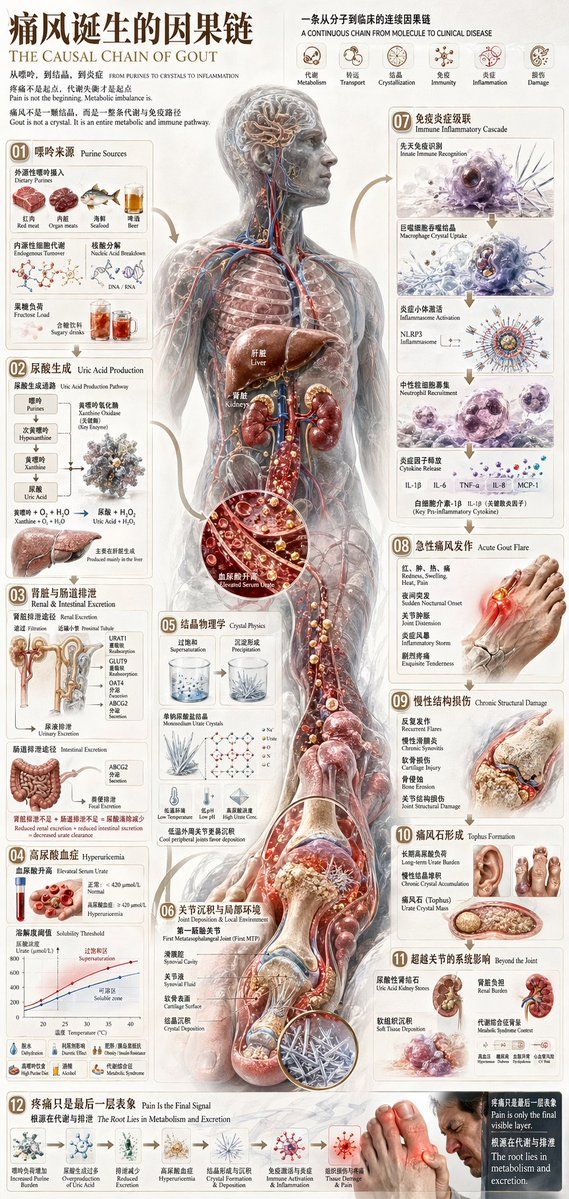
  "type": "comprehensive medical infographic",
  "style": "highly detailed 3D medical illustration, clinical white background, clean typography",
  "header": {
    "title_cn": "{argument name=\"main title\" default=\"痛风诞生的因果链\"}",
    "title_en": "{argument name=\"english title\" default=\"THE CAUSAL CHAIN OF GOUT\"}",
    "subtitle": "Pain is not the beginning. Metabolic imbalance is.",
    "top_right_sequence": {
      "count": 6,
      "labels": ["Metabolism", "Transport", "Crystallization", "Immunity", "Inflammation", "Damage"]
    }
  },
  "centerpiece": {
    "description": "{argument name=\"central figure\" default=\"transparent anatomical human body showing liver, kidneys, and vascular system\"}",
    "details": "pathway highlighted in {argument name=\"highlight color\" default=\"glowing red\"} descending to the foot"
  },
  "layout": {
    "left_column": [
      { "id": "01", "title": "Purine Sources", "elements": 6, "labels": ["Red meat", "Organ meats", "Seafood", "Beer", "Endogenous", "Fructose"] },
      { "id": "02", "title": "Uric Acid Production", "elements": 2, "labels": ["Chemical pathway", "Liver"] },
      { "id": "03", "title": "Renal & Intestinal Excretion", "elements": 2, "labels": ["Kidney nephron", "Intestines"] },
      { "id": "04", "title": "Hyperuricemia", "elements": 2, "labels": ["Blood vial", "Solubility graph"] }
    ],
    "center_overlay": [
      { "id": "05", "title": "Crystal Physics", "elements": 3, "labels": ["Supersaturation beaker", "Precipitation beaker", "Molecular structure"] },
      { "id": "06", "title": "Joint Deposition & Local Environment", "elements": 1, "labels": ["First MTP joint cross-section"] }
    ],
    "right_column": [
      { "id": "07", "title": "Immune Inflammatory Cascade", "elements": 4, "labels": ["Macrophage", "Inflammasome", "Neutrophil", "Cytokines"] },
      { "id": "08", "title": "Acute Gout Flare", "elements": 1, "labels": ["Inflamed foot"] },
      { "id": "09", "title": "Chronic Structural Damage", "elements": 1, "labels": ["Bone erosion joint"] },
      { "id": "10", "title": "Tophus Formation", "elements": 2, "labels": ["Hand tophi", "Foot tophi"] },
      { "id": "11", "title": "Beyond the Joint", "elements": 2, "labels": ["Kidney stones", "Systemic burden"] }
    ],
    "bottom_row": [
      { "id": "12", "title": "Pain Is the Final Signal", "elements": 7, "labels": ["Increased Purine", "Overproduction", "Reduced Excretion", "Hyperuricemia", "Crystal Formation", "Immune Activation", "Man in pain"] }
    ]
  },
  "theme": "{argument name=\"disease focus\" default=\"gout and uric acid crystallization\"}"
}- Category
- Charts & Infographics
- Model
- GPT Image 2
- Creator
- freestylefly
- Source ID
- 68
Views3