19

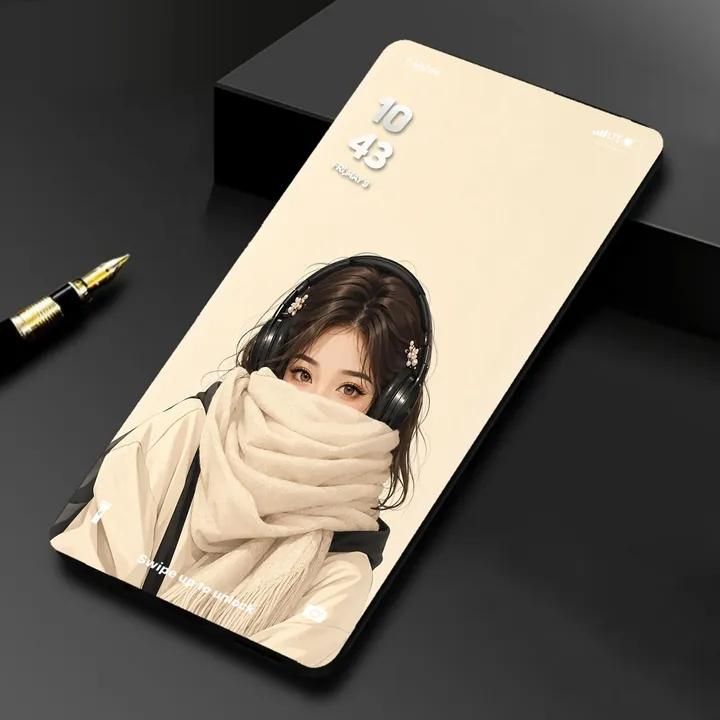
现代无边框智能手机与黑金钢笔摄影
Enlarge

现代无边框智能手机与黑金钢笔摄影

Prompt
A photorealistic product shot of a modern bezel-less smartphone placed at a slight angle on a matte black surface, with a black and gold fountain pen partially visible beside it, creating a sleek professional aesthetic. The phone features an ultra-thin futuristic design with curved corners and a high screen-to-body ratio, lit with soft cinematic lighting and subtle reflections. The screen shows a minimal lock screen UI with the time “10:43,” date “FRI, MAY 9,” status icons, and faint “Swipe up to unlock” text. The wallpaper is a detailed anime-style illustration of a young woman with expressive brown eyes, long dark hair with metallic clips, wearing black over-ear headphones and a thick beige knit scarf covering the lower face, set against a soft cream background. Ultra-detailed, premium tech aesthetic, shallow depth of field, 8K, minimal composition.
Category
UI & Interfaces
Model
ChatGPT
Views31
Source ID
17135
Published
Jun 30, 2026

Guide

About "现代无边框智能手机与黑金钢笔摄影"

What is this prompt for?

"现代无边框智能手机与黑金钢笔摄影" AI image prompt for ChatGPT (UI & Interfaces). 一张现代无边框智能手机的照片级产品照,以微弱角度放置在哑光黑色表面上,旁边部分可见一支黑金色的钢笔,营造出干练专业的审美。手机采用超薄未来主义设计,带有圆角和高屏占比,由柔和的电影感灯光…

The full copyable prompt and example visuals above are ready for AI image generation or one-click recreate in Picva.

How to use this prompt

  1. Step 1

    Open the prompt detail

    Review the example visuals, category, and full prompt text for "现代无边框智能手机与黑金钢笔摄影".

  2. Step 2

    Copy the prompt

    Copy the prompt body from this page, or load it directly in Studio.

  3. Step 3

    Pick a model (ChatGPT)

    Prefer ChatGPT. If you switch models, keep subject and composition and tweak style terms.

  4. Step 4

    Generate and export

    Recreate the look in Picva, or export into your workflow for editing and publishing.

FAQ

What is the "现代无边框智能手机与黑金钢笔摄影" prompt?
It is an AI image-generation prompt for ChatGPT in the UI & Interfaces category. This page includes the full prompt text, example visuals, and a one-click recreate path in Picva.
How do I use this prompt to generate an image?
Copy the prompt from this page, or use Generate / Studio. Paste it into a compatible image model, or recreate the look in Picva with optional reference images.
Which model is this prompt for?
This page lists ChatGPT. Most descriptive prompts also transfer to nearby image models such as GPT Image, Flux, or Midjourney with light style tweaks.
Can I use the result commercially?
You can usually copy the prompt for creation, but commercial use of the final image depends on the model terms, reference-image rights, and the generated content. Follow the source author and platform rules.