粗野主义技术系统 Slides
Prompt
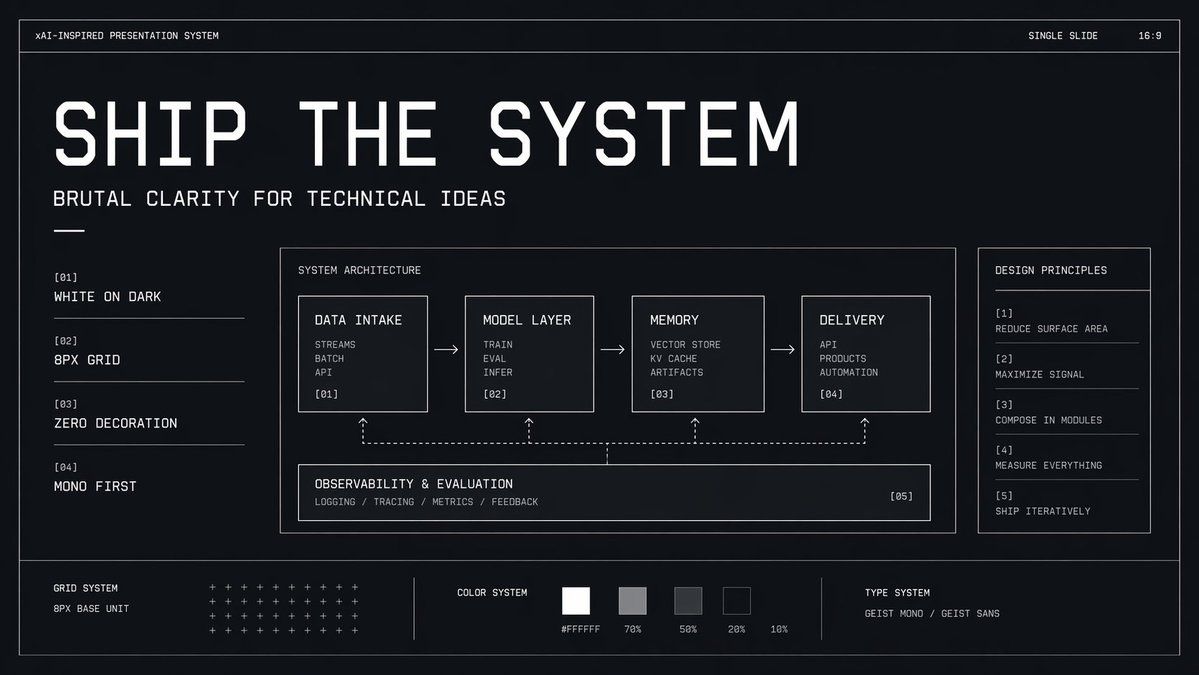
{"type":"minimal monochrome presentation slide","style":"high-contrast brutalist technical design, black background with subtle navy tint, thin white wireframe borders, zero decoration, strict grid, mono-first typography, futuristic industrial UI aesthetic","canvas":{"aspect_ratio":"16:9","background":"near-black with faint blue undertone and slight vignette"},"headline":{"text":"{argument name=\"headline text\" default=\"SHIP THE SYSTEM\"}","position":"upper left","style":"very large condensed geometric techno sans in white, all caps, widely tracked, dominant hero title"},"subheadline":{"text":"{argument name=\"subheadline text\" default=\"BRUTAL CLARITY FOR TECHNICAL IDEAS\"}","position":"below headline","style":"medium white monospace or mono-inspired sans, all caps"},"top_bar":{"count":3,"items":[{"text":"xAI-INSPIRED PRESENTATION SYSTEM","position":"top left"},{"text":"SINGLE SLIDE","position":"top right"},{"text":"16:9","position":"far top right"}]},"layout":{"outer_frame":true,"sections":[{"title":"left principles list","position":"left column","count":4,"labels":["[01] WHITE ON DARK","[02] 8PX GRID","[03] ZERO DECORATION","[04] MONO FIRST"]},{"title":"SYSTEM ARCHITECTURE","position":"center large panel","count":5,"labels":["DATA INTAKE","MODEL LAYER","MEMORY","DELIVERY","OBSERVABILITY & EVALUATION"]},{"title":"DESIGN PRINCIPLES","position":"right sidebar panel","count":5,"labels":["[1] REDUCE SURFACE AREA","[2] MAXIMIZE SIGNAL","[3] COMPOSE IN MODULES","[4] MEASURE EVERYTHING","[5] SHIP ITERATIVELY"]},{"title":"bottom system strip","position":"bottom full width","count":3,"labels":["GRID SYSTEM","COLOR SYSTEM","TYPE SYSTEM"]}]},"center_panel":{"bordered":true,"title":"SYSTEM ARCHITECTURE","flow":{"count":4,"boxes":[{"title":"DATA INTAKE","index":"[01]","lines":["STREAMS","BATCH","API"]},{"title":"MODEL LAYER","index":"[02]","lines":["TRAIN","EVAL","INFER"]},{"title":"MEMORY","index":"[03]","lines":["VECTOR STORE","KV CACHE","ARTIFACTS"]},{"title":"DELIVERY","index":"[04]","lines":["API","PRODUCTS","AUTOMATION"]}],"connectors":"3 right-pointing arrows between the 4 top boxes"},"bottom_module":{"title":"OBSERVABILITY & EVALUATION","index":"[05]","lines":["LOGGING / TRACING / METRICS / FEEDBACK"],"connectors":"dashed feedback line spanning beneath the 4 boxes with 4 upward dotted arrows linking back into each top box"}},"bottom_strip":{"left_block":{"title":"GRID SYSTEM","subtitle":"8PX BASE UNIT","visual":"dense matrix of small white plus signs arranged in rows"},"middle_block":{"title":"COLOR SYSTEM","swatch_count":5,"swatches":["#FFFFFF","70%","50%","20%","10%"],"visual":"five grayscale square swatches from white to very dark gray"},"right_block":{"title":"TYPE SYSTEM","text":"{argument name=\"type label\" default=\"GEIST MONO / GEIST SANS\"}"}},"composition":"clean generous spacing, all elements aligned to an 8px grid, mostly left-aligned text, thin divider lines, no photos, no gradients except extremely subtle background depth, technical pitch-deck cover slide look","rendering":"crisp vector presentation mockup, ultra-sharp typography, polished design system board"}- Category
- Charts & Infographics
- Model
- GPT Image 2
- Creator
- Russell
- Source ID
- 14872
- Published
- Apr 22, 2026
Views3