动漫休息室视觉小说场景
Prompt
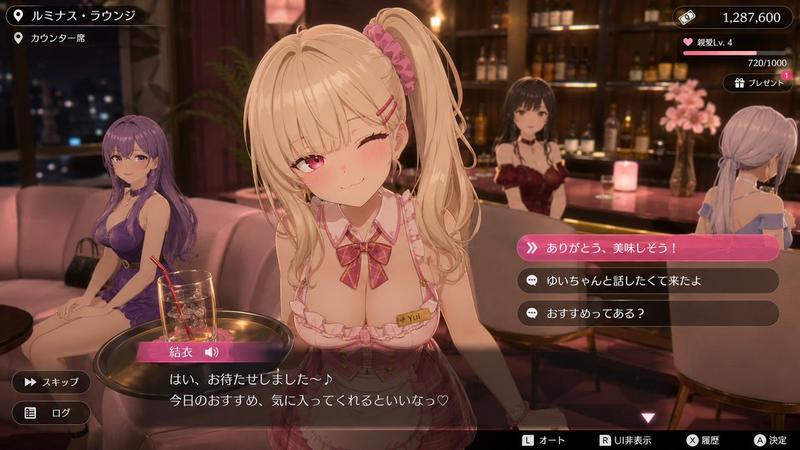
{"type":"3D anime dating-sim visual novel event scene screenshot","aspect_ratio":"16:9 widescreen game UI","style":"high-quality 3D anime render with soft depth of field, warm cinematic lounge lighting, glossy game interface overlays, romantic hostess club atmosphere, polished mobile/console game screenshot","setting":{"location_name":"{argument name=\"location name\" default=\"ルミナス・ラウンジ\"}","sub_location":"{argument name=\"sub location\" default=\"カウンター席\"}","environment":"luxury lounge bar at night with pink sofas, round black tables, backlit liquor shelves, warm candles, city lights through dark windows, burgundy curtains, decorative flowers, amber and rose lighting"},"main_character":{"name":"{argument name=\"character name\" default=\"結衣\"}","position":"large foreground center, leaning toward the viewer across a small table","appearance":"cute blonde anime hostess with long twin ponytails, pink scrunchie, side-swept bangs, pink hairpins, pink eyes, blushing cheeks, one eye winking, gentle teasing smile","outfit":"pink-and-white frilled hostess uniform with deep neckline, plaid bow at collar, fitted bodice, name tag reading Yui, delicate bracelet, feminine idol-hostess styling","pose":"friendly service pose, slightly tilted head, shoulders forward, intimate eye contact"},"background_characters":{"count":3,"descriptions":["left background: seated woman with long purple hair wearing a purple dress on a pink sofa beside a handbag","center rear: dark-haired bartender or hostess behind the bar wearing a burgundy outfit","right background: pale lavender-haired woman seated at the counter in an off-shoulder dress, seen from behind"]},"foreground_props":{"count":2,"items":["small round side table with a gold-rimmed tray","clear cocktail glass with ice, red straw, and pink drink garnish"]},"ui_layout":{"top_left_location_panel":{"count":2,"items":["pin icon with location text: ルミナス・ラウンジ","pin icon with sub-location text: カウンター席"]},"top_right_status_panel":{"count":3,"items":["money counter with ticket icon reading 1,287,600","affection level bar with heart icon reading 親愛Lv. 4 and progress 720/1000","gift button with present icon reading プレゼント and a pink notification badge +1"]},"dialogue_area":{"bottom_dialogue_box":"semi-transparent black dialogue window spanning the bottom, character nameplate in pink gradient labeled 結衣 with a speaker icon","dialogue_text":"{argument name=\"dialogue text\" default=\"はい、お待たせしました~♪ 今日のおすすめ、気に入ってくれるといいなっ♡\"}","controls_count":2,"left_controls":["スキップ button with fast-forward icon","ログ button with list icon"]},"choice_menu":{"position":"right center","count":3,"style":"rounded horizontal choice buttons, first option highlighted in bright pink gradient with double-chevron icon, remaining options dark translucent with chat-bubble icons","choices":["{argument name=\"highlighted choice\" default=\"ありがとう、美味しそう!\"}","ゆいちゃんと話したくて来たよ","おすすめってある?"]},"bottom_button_hints":{"count":4,"items":["L オート","R UI非表示","X 履歴","A 決定"]}},"composition":"Place the main character sharply in focus and oversized in the center foreground, with background patrons softly blurred. Keep the UI readable and layered over the scene like an actual playable game event screen. Use a warm pink, gold, and dark brown color palette, realistic bar reflections, shallow depth of field, and a romantic premium hostess lounge mood."}- Category
- Charts & Infographics
- Model
- GPT Image 2
- Creator
- サボテン|AI活用Tips
- Source ID
- 19731
- Published
- May 11, 2026
Views13