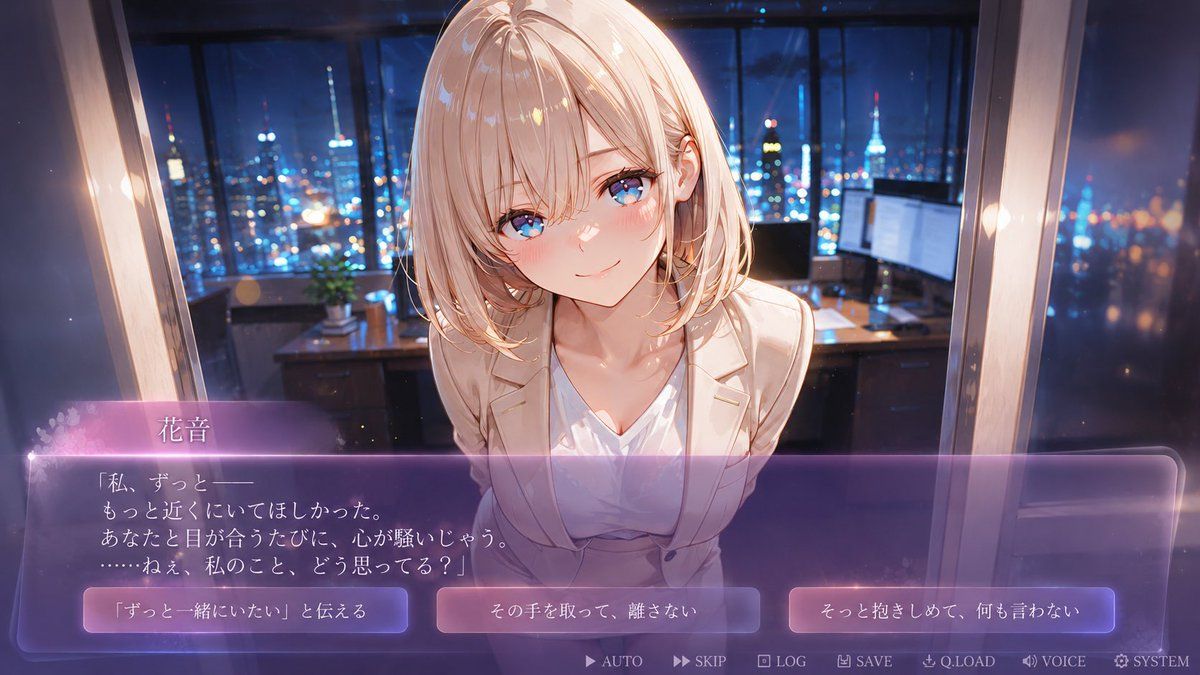
无脸恋爱视觉小说 CG
Prompt
{"type":"anime visual novel romance game screenshot","format":"16:9 widescreen CG with interactive dialogue UI","scene":{"setting":"luxury high-rise office at night, floor-to-ceiling windows, glowing city skyline and tower lights outside, desk with monitors and small plant in the background, soft bokeh, cinematic depth of field","mood":"intimate confession scene, emotional, dreamy, premium dating sim atmosphere","camera":"first-person player viewpoint, close-up medium shot, character leaning toward the viewer across the desk, slight wide-angle perspective"},"character":{"name":"{argument name=\"character name\" default=\"花音\"}","appearance":"young adult anime woman with shoulder-length pale blonde hair, soft layered bob, fair skin, elegant slim build, wearing a cream blazer over a white V-neck blouse, delicate office-lady styling","pose":"leaning forward with shoulders slightly drawn in, face very close to the viewer, gentle vulnerable body language","face":"faceless smooth skin-colored oval where facial features would be, intentionally blank and uncanny while preserving hair, ears, neck, and body details"},"lighting_and_style":{"style":"high-quality Japanese anime game CG, polished visual novel art, glossy highlights, soft bloom, romantic purple-blue night lighting, warm rim light on hair and blazer, detailed painterly background","color_palette":"deep navy and cobalt city lights contrasted with warm ivory clothing and translucent violet UI"},"ui":{"dialogue_box":{"position":"bottom third of the screen","style":"large translucent rounded rectangle, purple glassmorphism gradient, glowing pink-violet top edge, thin luminous border, soft sparkles and floral particles on the left","speaker_name":"{argument name=\"speaker name\" default=\"花音\"}","dialogue_text":"{argument name=\"dialogue text\" default=\"「私、ずっと——\\nもっと近くにいてほしかった。\\nあなたと目が合うたびに、心が騒いじゃう。\\n……ねぇ、私のこと、どう思ってる?」\"}"},"choice_buttons":{"count":3,"position":"inside the dialogue area along the lower portion, evenly spaced left to right","style":"three glowing rounded rectangular buttons with purple-pink gradients and white Japanese text","labels":["{argument name=\"left choice text\" default=\"「ずっと一緒にいたい」と伝える\"}","その手を取って、離さない","そっと抱きしめて、何も言わない"]},"bottom_menu":{"count":7,"position":"very bottom edge, small pale icons and labels","labels":["AUTO","SKIP","LOG","SAVE","Q.LOAD","VOICE","SYSTEM"]}},"composition":"Place the character centered and large, upper body filling the middle, dialogue UI overlaying the lower third, city office background visible through and above the interface. Make the image look like an actual playable romance visual novel screenshot, not a poster."}- Category
- UI & Interfaces
- Model
- GPT Image 2
- Creator
- 花音-kaito-@トレンド収集&AIイラスト
- Source ID
- 18934
- Published
- May 7, 2026
Views12