16

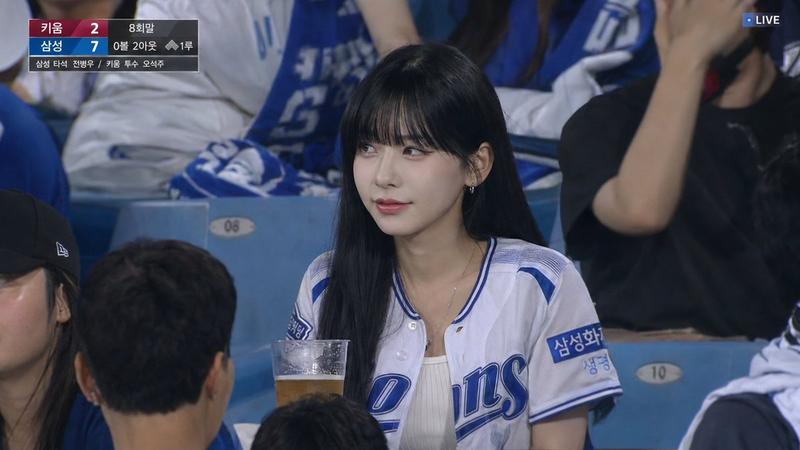
2026世界杯VIP包厢直播切场写实摄影
Enlarge

Example images

2026世界杯VIP包厢直播切场写实摄影

Prompt
Photorealistic FIFA World Cup 2026 live broadcast cutaway inside a VIP stadium suite. Use the attached reference image as the sole facial identity reference (preserve exact face, skin tone, age, proportions, and modest presentation; keep hijab fully covering hair/neck if present). Do not copy original pose or expression.

Scene: premium glass VIP box overlooking a packed modern stadium during a high-stakes match between [TEAM A] and [TEAM B] in [CITY/STADIUM].

Shot: candid telephoto broadcast frame (200–400mm), waist-up composition, shallow depth of field, sharp face focus, soft crowd blur, subtle glass reflections, realistic stadium lighting.

Pose: natural stance facing pitch (30–60°), no eye contact with camera, hands resting calmly (no gestures). Expression: focused and tense, reacting to a critical match moment (attack/corner/penalty).

Environment: surrounding spectators in team jerseys, partially cropped, all watching pitch. Add soft foreground blur elements for depth without blocking subject.

Overlay: compact broadcast scoreboard top-left with flags, team codes, timer, scores, trophy icon. Clean, minimal, no “LIVE”.

Style: ultra-realistic sports TV broadcast look, natural skin texture, realistic fabric folds, 4K clarity, documentary feel, not studio or CGI.

Aspect ratio: 15:4
Category
Posters & Typography
Model
ChatGPT
Views69
Source ID
16274
Published
Jun 18, 2026

Guide

About "2026世界杯VIP包厢直播切场写实摄影"

What is this prompt for?

"2026世界杯VIP包厢直播切场写实摄影" AI image prompt for ChatGPT (Posters & Typography). 照片级写实的 2026 年 FIFA 世界杯 VIP 体育场包厢内的直播切场画面。使用附带的参考图像作为唯一的面部身份参考(保持精确的面部、肤色、年龄、比例和端庄的呈现…

The full copyable prompt and example visuals above are ready for AI image generation or one-click recreate in Picva.

How to use this prompt

  1. Step 1

    Open the prompt detail

    Review the example visuals, category, and full prompt text for "2026世界杯VIP包厢直播切场写实摄影".

  2. Step 2

    Copy the prompt

    Copy the prompt body from this page, or load it directly in Studio.

  3. Step 3

    Pick a model (ChatGPT)

    Prefer ChatGPT. If you switch models, keep subject and composition and tweak style terms.

  4. Step 4

    Generate and export

    Recreate the look in Picva, or export into your workflow for editing and publishing.

FAQ

What is the "2026世界杯VIP包厢直播切场写实摄影" prompt?
It is an AI image-generation prompt for ChatGPT in the Posters & Typography category. This page includes the full prompt text, example visuals, and a one-click recreate path in Picva.
How do I use this prompt to generate an image?
Copy the prompt from this page, or use Generate / Studio. Paste it into a compatible image model, or recreate the look in Picva with optional reference images.
Which model is this prompt for?
This page lists ChatGPT. Most descriptive prompts also transfer to nearby image models such as GPT Image, Flux, or Midjourney with light style tweaks.
Can I use the result commercially?
You can usually copy the prompt for creation, but commercial use of the final image depends on the model terms, reference-image rights, and the generated content. Follow the source author and platform rules.