15

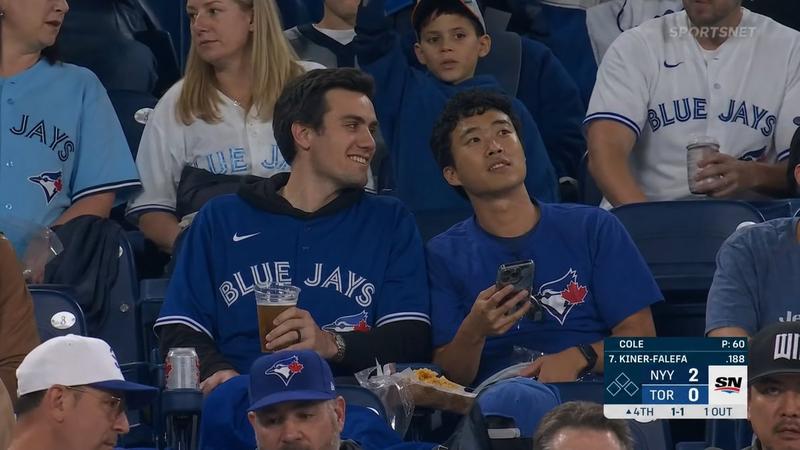
棒球直播看台观众席抓拍写实画面
Enlarge

棒球直播看台观众席抓拍写实画面

Prompt
"Create an image
Ultra-realistic TV broadcast screenshot, identity preserved exactly from reference image. Young woman sitting in the crowd at a 2025/2026 MLB baseball game, filmed from far away by a live broadcast camera. She is seated in stadium chairs, slightly leaned back, looking off to the side with a surprised caught-on-camera expression, lips slightly parted. She wears a casual MLB baseball team jersey with jeans, authentic match-day styling, relaxed pose, one arm resting on the chair or lap. The jersey should look like a normal full jersey, not a crop top, not rolled up, not tied. Around her are other fans in stadium seats, slightly blurred. Keep the crowd mixed and natural some fans wearing baseball jerseys, some wearing neutral shirts or jackets, some wearing other casual game-day clothing so it feels like a real live crowd shot and not everyone is dressed the same. Add a realistic MLB broadcast scoreboard graphic in the top corner showing two baseball teams with innings, runs, hits, and errors score format  like "NYY 3 | BOS 5 • 7th inning"  subtle broadcast compression, digital noise, bright stadium lighting, and imperfect live-TV framing. Telephoto sports camera look from the stands, not close-up, not selfie, not side angle, authentic televised baseball crowd shot, natural skin texture, no smoothing, 4K."
Category
Brand & Logos
Model
ChatGPT
Views103
Source ID
14519
Published
May 18, 2026

Guide

About "棒球直播看台观众席抓拍写实画面"

What is this prompt for?

"棒球直播看台观众席抓拍写实画面" AI image prompt for ChatGPT (Brand & Logos). 生成一张图片。超写实电视直播截图,人物特征与参考图完全一致。一位年轻女性坐在 2025/2026 年 MLB 棒球赛的观众席中,由直播摄像机从远处拍摄。她坐在体育馆椅子上,身体微微后仰,看向一…

The full copyable prompt and example visuals above are ready for AI image generation or one-click recreate in Picva.

How to use this prompt

  1. Step 1

    Open the prompt detail

    Review the example visuals, category, and full prompt text for "棒球直播看台观众席抓拍写实画面".

  2. Step 2

    Copy the prompt

    Copy the prompt body from this page, or load it directly in Studio.

  3. Step 3

    Pick a model (ChatGPT)

    Prefer ChatGPT. If you switch models, keep subject and composition and tweak style terms.

  4. Step 4

    Generate and export

    Recreate the look in Picva, or export into your workflow for editing and publishing.

FAQ

What is the "棒球直播看台观众席抓拍写实画面" prompt?
It is an AI image-generation prompt for ChatGPT in the Brand & Logos category. This page includes the full prompt text, example visuals, and a one-click recreate path in Picva.
How do I use this prompt to generate an image?
Copy the prompt from this page, or use Generate / Studio. Paste it into a compatible image model, or recreate the look in Picva with optional reference images.
Which model is this prompt for?
This page lists ChatGPT. Most descriptive prompts also transfer to nearby image models such as GPT Image, Flux, or Midjourney with light style tweaks.
Can I use the result commercially?
You can usually copy the prompt for creation, but commercial use of the final image depends on the model terms, reference-image rights, and the generated content. Follow the source author and platform rules.