15

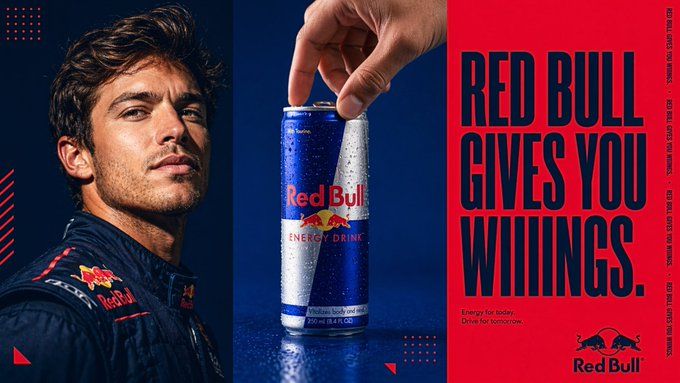
高端品牌三屏广告海报设计
Enlarge

Example images

高端品牌三屏广告海报设计

Prompt
A professional 16:9 brand advertising poster for [BRAND], split into three horizontal panels. Left panel: a close-up portrait of a person in brand-colored clothing, dramatic studio lighting, direct or slightly off-camera gaze. Center panel: a hero shot of the brand's product with a hand interacting with it, clean background in the brand's primary color. Right panel: solid brand-color background with oversized bold serif or condensed sans-serif headline text in the secondary color, brand tagline in small text below, brand logo bottom right corner, and the headline phrase repeated vertically in tiny text along the right edge as a design element. Small geometric shapes and dot grid patterns as decorative accents. Overall aesthetic: high-end commercial photography, tight color palette of two brand colors only, editorial and cinematic feel. Photorealistic. Ultra HD.
Category
Posters & Typography
Model
Nano Banana Pro
Views77
Source ID
13694
Published
Apr 24, 2026

Guide

About "高端品牌三屏广告海报设计"

What is this prompt for?

"高端品牌三屏广告海报设计" AI image prompt for Nano Banana Pro (Posters & Typography). 一张为 [BRAND] 制作的专业 16:9 品牌广告海报,分为三个水平面板。左侧面板:一个穿着品牌色服装的人物特写肖像,戏剧性的工作室灯光,直视或稍微偏离镜头的目光。…

The full copyable prompt and example visuals above are ready for AI image generation or one-click recreate in Picva.

How to use this prompt

  1. Step 1

    Open the prompt detail

    Review the example visuals, category, and full prompt text for "高端品牌三屏广告海报设计".

  2. Step 2

    Copy the prompt

    Copy the prompt body from this page, or load it directly in Studio.

  3. Step 3

    Pick a model (Nano Banana Pro)

    Prefer Nano Banana Pro. If you switch models, keep subject and composition and tweak style terms.

  4. Step 4

    Generate and export

    Recreate the look in Picva, or export into your workflow for editing and publishing.

FAQ

What is the "高端品牌三屏广告海报设计" prompt?
It is an AI image-generation prompt for Nano Banana Pro in the Posters & Typography category. This page includes the full prompt text, example visuals, and a one-click recreate path in Picva.
How do I use this prompt to generate an image?
Copy the prompt from this page, or use Generate / Studio. Paste it into a compatible image model, or recreate the look in Picva with optional reference images.
Which model is this prompt for?
This page lists Nano Banana Pro. Most descriptive prompts also transfer to nearby image models such as GPT Image, Flux, or Midjourney with light style tweaks.
Can I use the result commercially?
You can usually copy the prompt for creation, but commercial use of the final image depends on the model terms, reference-image rights, and the generated content. Follow the source author and platform rules.