17

哲学概念信息图手稿
Enlarge

哲学概念信息图手稿

Prompt
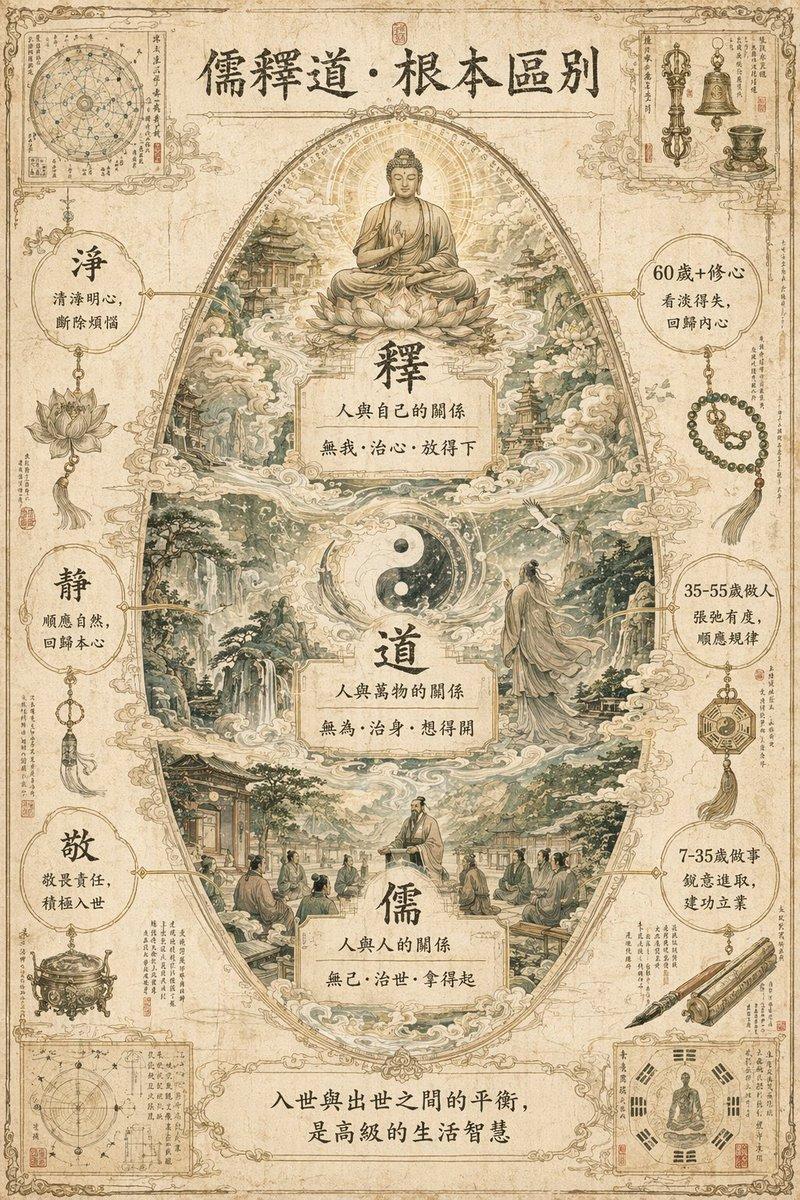
一幅令人叹为观止、极其复杂的「{argument name="主题" default="儒释道根本区别"}」概念世界构建信息图杰作,整体被设计成一部底蕴深厚的东方古典神话传说手稿。背景:纯白色复古纹理画布,浅米黄做旧牛皮纸底色,轻微毛边与水渍感。核心布局:中心视觉采用宏大的「竖版蛋形分层结构」,从上到下依次为释、道、儒三层。边缘边角料:四个角落点缀精细微观插图,主题为古代观测手记、法器与符文。色彩:低饱和鼠尾草绿、浅金、米白为主色调,整体清淡柔和,无刺眼高饱和色彩。细节:建筑线条、山水皴法、莲花纹路、云气层次清晰可见,纤毫毕现。无缝融合:三层之间通过云雾与水流自然过渡,释的佛光、道的太极云气、儒的书卷气息无缝衔接。风格:{argument name="艺术风格" default="古典墨水线稿+低饱和数字水彩"},清淡国风古籍手稿质感。文字标注:纯正繁体汉字,采用斑驳古风宋体,每个标注含短标题+一行诗意描述,由暗金色发丝引线连接对应细节,无重复指向。画幅比例:3:4竖版独立完整标题区(顶部):`儒釋道·根本區別`中心分层标注:顶层「釋」:`釋`,`人與自己的關係`,`無我·治心·放得下`中层「道」:`道`,`人與萬物的關係`,`無為·治身·想得開`底层「儒」:`儒`,`人與人的關係`,`無己·治世·拿得起`左右辅助标注:左侧:`淨`,`清淨明心,斷除煩惱`;`靜`,`順應自然,回歸本心`;`敬`,`敬畏責任,積極入世`右侧:`60歲+修心`,`看淡得失,回歸內心`;`35-55歲做人`,`張弛有度,順應規律`;`7-35歲做事`,`銳意進取,建功立业`底部总结文字:`入世與出世之間的平衡,是高級的生活智慧`
Category
Charts & Infographics
Model
GPT Image 2
Views6
Source ID
14137
Published
Apr 21, 2026

Guide

About "哲学概念信息图手稿"

What is this prompt for?

"哲学概念信息图手稿" AI image prompt for GPT Image 2 (Charts & Infographics). 一份极其详尽且复杂的提示词,用于生成一张设计为古代神话手稿风格的信息图,旨在阐述儒家、道家与佛家之间的核心差异。 Copy it on Picva and recreate the…

The full copyable prompt and example visuals above are ready for AI image generation or one-click recreate in Picva.

How to use this prompt

  1. Step 1

    Open the prompt detail

    Review the example visuals, category, and full prompt text for "哲学概念信息图手稿".

  2. Step 2

    Copy the prompt

    Copy the prompt body from this page, or load it directly in Studio.

  3. Step 3

    Pick a model (GPT Image 2)

    Prefer GPT Image 2. If you switch models, keep subject and composition and tweak style terms.

  4. Step 4

    Generate and export

    Recreate the look in Picva, or export into your workflow for editing and publishing.

FAQ

What is the "哲学概念信息图手稿" prompt?
It is an AI image-generation prompt for GPT Image 2 in the Charts & Infographics category. This page includes the full prompt text, example visuals, and a one-click recreate path in Picva.
How do I use this prompt to generate an image?
Copy the prompt from this page, or use Generate / Studio. Paste it into a compatible image model, or recreate the look in Picva with optional reference images.
Which model is this prompt for?
This page lists GPT Image 2. Most descriptive prompts also transfer to nearby image models such as GPT Image, Flux, or Midjourney with light style tweaks.
Can I use the result commercially?
You can usually copy the prompt for creation, but commercial use of the final image depends on the model terms, reference-image rights, and the generated content. Follow the source author and platform rules.