16

空灵的佛教净土场景
Enlarge

空灵的佛教净土场景

Prompt
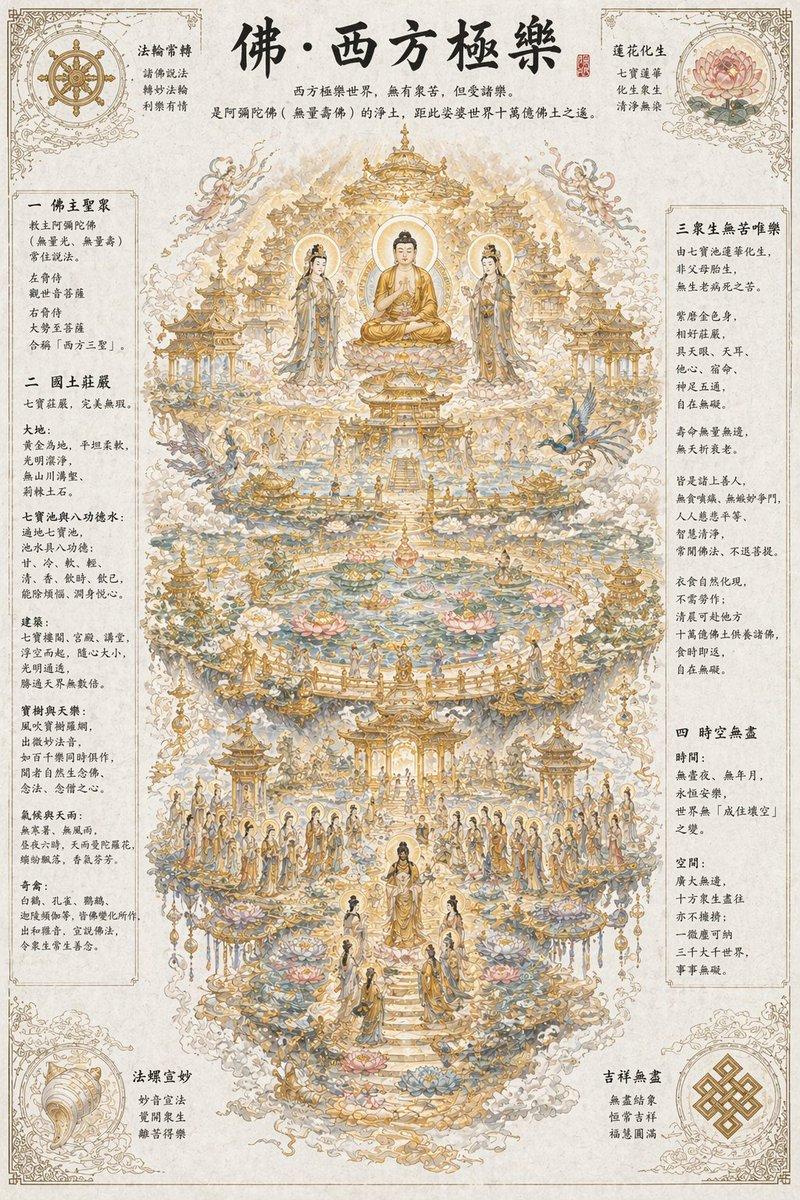
西方极乐世界(又称西方净土、安乐国),是阿弥陀佛(无量寿佛)的佛土,核心特点是无有众苦、但受诸乐,与我们这个 “堪忍”(婆婆)世界形成鲜明对比。
在我们世界的西方,距离十万亿佛土之遥(《阿弥陀经》)。

佛主:教主阿弥陀佛(无量光、无量寿),常住说法;左右胁侍为观世音菩萨、大势至菩萨,合称 “西方三圣”。

国土环境:七宝庄严,完美无瑕
大地:黄金为地,平坦柔软、光明洁净,无山川沟壑、荆棘土石。
七宝池与八功德水:
遍地七宝池(金、银、琉璃、玻璃、砗磲、赤珠、玛瑙)。
池水具八功德:甘、冷、软、轻、清、香、饮时、饮已,能除烦恼、润身悦心。
池底金沙,阶道七宝,池中莲花大如车轮,青、黄、赤、白,各放光明。
建筑:七宝楼阁、宫殿、讲堂,浮空而起、随心大小,光明通透,胜过天界无数倍。
宝树与天乐:
七重行树、七重栏楯、七重罗网,皆四宝所成。
风吹宝树罗网,出微妙法音,如百千乐同时俱作,闻者自然生念佛、念法、念僧之心。
气候与天雨:无寒暑、无风雨,永远温和舒适;昼夜六时,天雨曼陀罗花,缤纷铺落,香气芬芳。
奇禽:白鹤、孔雀、鹦鹉、迦陵频伽等,皆佛变化所作,出和雅音,宣说佛法,令众生常生善念。

众生:无苦唯乐,寿命无量
往生方式:众生由七宝池莲花化生,非父母胎生,无生老病死之苦。
身形:紫磨金色身,相好庄严,与阿弥陀佛相似;具天眼、天耳、他心、宿命、神足五通,自在无碍。
寿命:无量无边阿僧祇劫,几乎永恒,无夭折衰老。
心性:皆是诸上善人,无贪嗔痴、无嫉妒争斗,人人慈悲平等、智慧清净,常闻佛法、不退菩提。
生活:衣食自然化现,不需劳作;清晨可赴他方十万亿佛土供养诸佛,食时即返,自在无碍。

时间与空间:无限永恒
时间:无昼夜、无年月,永恒安乐,世界无 “成住坏空” 之变。
空间:广大无边,十方众生尽往亦不拥挤;一微尘可纳三千大千世界,事事无碍。
Category
Architecture & Spaces
Model
GPT Image 2
Views7
Source ID
15573
Published
Apr 24, 2026

Guide

About "空灵的佛教净土场景"

What is this prompt for?

"空灵的佛教净土场景" AI image prompt for GPT Image 2 (Architecture & Spaces). 一个高度详细的提示词,描述了西方极乐世界(Sukhavati),包含黄金大地、莲花池和神圣的建筑。 Copy it on Picva and recreate the look i…

The full copyable prompt and example visuals above are ready for AI image generation or one-click recreate in Picva.

How to use this prompt

  1. Step 1

    Open the prompt detail

    Review the example visuals, category, and full prompt text for "空灵的佛教净土场景".

  2. Step 2

    Copy the prompt

    Copy the prompt body from this page, or load it directly in Studio.

  3. Step 3

    Pick a model (GPT Image 2)

    Prefer GPT Image 2. If you switch models, keep subject and composition and tweak style terms.

  4. Step 4

    Generate and export

    Recreate the look in Picva, or export into your workflow for editing and publishing.

FAQ

What is the "空灵的佛教净土场景" prompt?
It is an AI image-generation prompt for GPT Image 2 in the Architecture & Spaces category. This page includes the full prompt text, example visuals, and a one-click recreate path in Picva.
How do I use this prompt to generate an image?
Copy the prompt from this page, or use Generate / Studio. Paste it into a compatible image model, or recreate the look in Picva with optional reference images.
Which model is this prompt for?
This page lists GPT Image 2. Most descriptive prompts also transfer to nearby image models such as GPT Image, Flux, or Midjourney with light style tweaks.
Can I use the result commercially?
You can usually copy the prompt for creation, but commercial use of the final image depends on the model terms, reference-image rights, and the generated content. Follow the source author and platform rules.