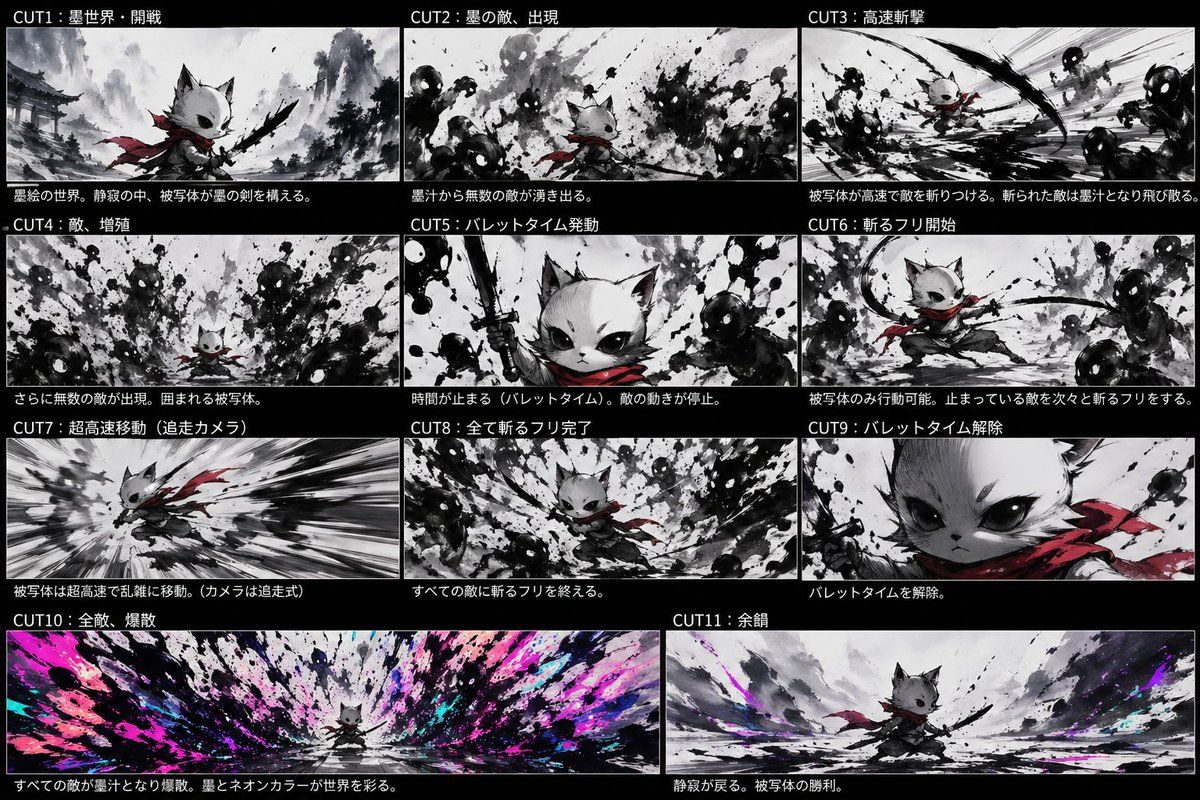
水墨霓虹猫武士项目
Prompt
{"type":"anime storyboard sheet","style":"dynamic sumi-e ink painting fused with neon accents, cinematic concept board, monochrome black-and-white base with selective crimson and electric magenta/cyan highlights, rough brush splatter textures, high contrast, dramatic speed lines, manga action composition","subject":{"main character":"small anthropomorphic cat warrior with white fur, oversized dark eyes, pointed ears, a short muzzle, and a determined expression","outfit":["flowing {argument name=\"scarf color\" default=\"crimson red\"} scarf","dark loose samurai-style clothing","black ink sword held in one paw"],"scale":"tiny hero against overwhelming waves of ink enemies"},"layout":{"background":"solid black page with 11 storyboard panels separated by thin white borders","sections":[{"title":"CUT1:墨世界・開戦","position":"top-left","count":1,"labels":["opening battle in the ink world"]},{"title":"CUT2:墨の敵、出現","position":"top-center","count":1,"labels":["ink enemies appear from splashes"]},{"title":"CUT3:高速斬撃","position":"top-right","count":1,"labels":["high-speed slash attack"]},{"title":"CUT4:敵、増殖","position":"middle-left","count":1,"labels":["enemies multiply and surround the hero"]},{"title":"CUT5:バレットタイム発動","position":"middle-center","count":1,"labels":["bullet time activated"]},{"title":"CUT6:斬るフリ開始","position":"middle-right","count":1,"labels":["begin fake slashing while time is stopped"]},{"title":"CUT7:超高速移動(追走カメラ)","position":"lower-left","count":1,"labels":["ultra-fast movement with chase camera"]},{"title":"CUT8:全て斬るフリ完了","position":"lower-center","count":1,"labels":["all fake slashes completed"]},{"title":"CUT9:バレットタイム解除","position":"lower-right","count":1,"labels":["bullet time released"]},{"title":"CUT10:全敵、爆散","position":"bottom-left wide","count":1,"labels":["all enemies explode into ink and neon color"]},{"title":"CUT11:余韻","position":"bottom-right wide","count":1,"labels":["quiet aftermath and victory pose"]}],"count":11},"panels":[{"title":"CUT1:墨世界・開戦","scene":"A misty ink-wash battlefield with distant traditional Japanese temple architecture and mountains. The cat warrior stands in the foreground in a low ready stance, scarf trailing, raising a black brushlike sword. The world is mostly grayscale with subtle red on the scarf.","camera":"medium-wide low angle"},{"title":"CUT2:墨の敵、出現","scene":"Dozens of amorphous shadow enemies with glowing white eyes emerge from violent black ink splashes around the small cat. Chaotic splatter fills the frame.","camera":"wide shot"},{"title":"CUT3:高速斬撃","scene":"The hero launches into a rapid diagonal slash through clustered ink monsters. Strong motion streaks and curved black slash arcs dominate the composition.","camera":"dynamic action perspective"},{"title":"CUT4:敵、増殖","scene":"The enemies increase in number, surrounding the cat from all directions. Dense abstract silhouettes and splashes close in menacingly.","camera":"wide encirclement shot"},{"title":"CUT5:バレットタイム発動","scene":"Close-up hero shot. The cat lifts the sword vertically with fierce confidence as nearby ink enemies freeze in place. Splatter textures remain suspended midair.","camera":"tight close-up"},{"title":"CUT6:斬るフリ開始","scene":"In frozen time, only the cat moves, stepping through a poised slashing gesture among immobilized shadow enemies. The scarf draws elegant red curves through the grayscale scene.","camera":"medium action shot"},{"title":"CUT7:超高速移動(追走カメラ)","scene":"A speed-tunnel composition with the cat sprinting or dashing at extreme velocity, body leaning forward, scarf whipping behind, background stretched into black-and-white radial blur.","camera":"tracking chase shot"},{"title":"CUT8:全て斬るフリ完了","scene":"The hero returns to the center after finishing all staged slash poses around every enemy. Ink masses form a circular vortex around the calm cat.","camera":"wide centered shot"},{"title":"CUT9:バレットタイム解除","scene":"Extreme close-up of the cat's face and shoulder, intense eyes looking forward, red scarf prominent, signaling the end of bullet time.","camera":"extreme close-up"},{"title":"CUT10:全敵、爆散","scene":"A massive panoramic detonation as every frozen enemy bursts at once into black ink, bright {argument name=\"neon accent colors\" default=\"magenta, cyan, and violet\"} paint, and explosive splashes radiating outward from the tiny centered hero.","camera":"ultra-wide panoramic shot"},{"title":"CUT11:余韻","scene":"After the explosion, the battlefield becomes quiet again. The cat stands victorious in a broad ink-wash landscape with residual neon color streaks fading into the mist.","camera":"wide heroic epilogue shot"}],"text":{"header language":"Japanese","captions":"each panel has white Japanese title text on black bars and a short explanatory sentence below the image area"},"rendering":{"aspect ratio":"16:9 overall sheet","finish":"polished storyboard illustration, concept-art quality, expressive ink splashes, seamless visual continuity between panels"}}- Category
- Charts & Infographics
- Model
- GPT Image 2
- Creator
- ヤレヤル
- Source ID
- 17200
- Published
- Apr 29, 2026
Views9


![[PROJECT CARD] Create a compact designed masthead, not a table](https://i.pixshop.app/storage/v1/render/image/public/prompt-source-media/promptsref/work-19033/image-1-120e6393796318e7.png?width=800&quality=75&resize=contain)