M2010 ESR 战术规格说明书
Prompt
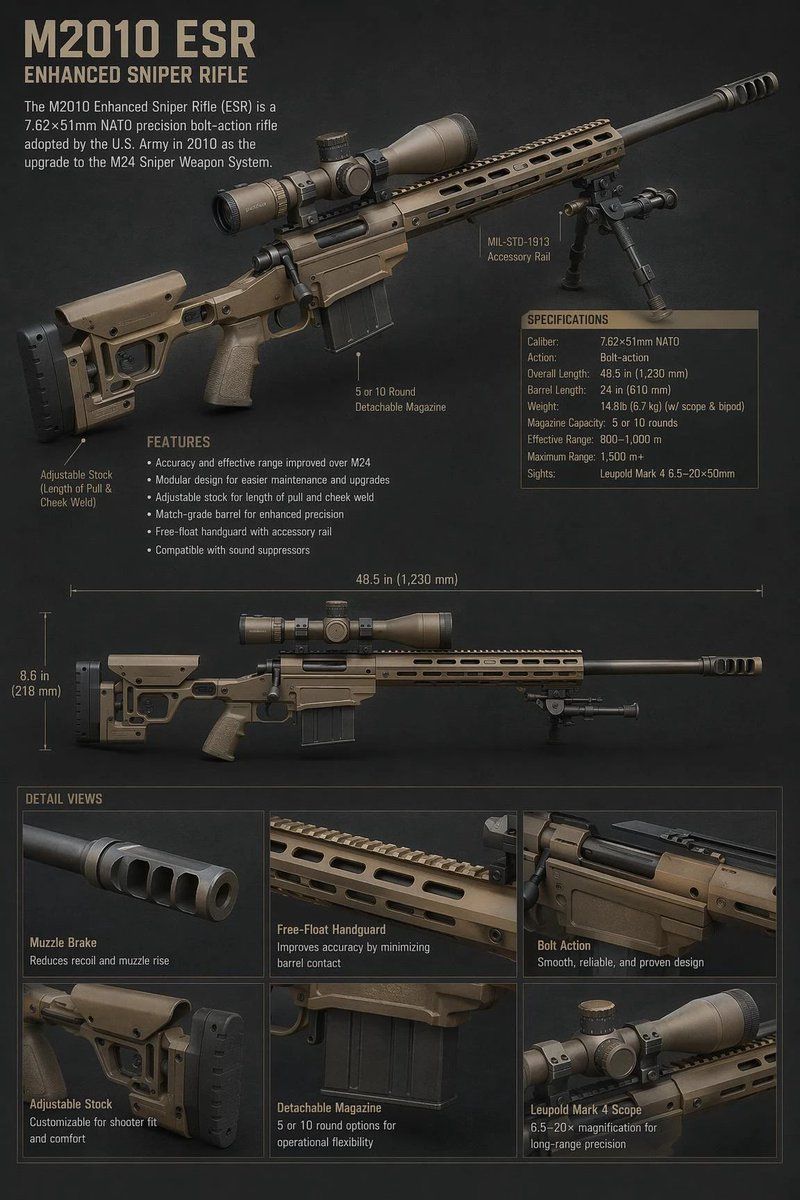
Goal: Create a realistic military technical character-sheet style infographic for the {argument name="rifle model" default="M2010 ESR"}, showing a tan enhanced sniper rifle with labeled components, specifications, measurement guides, and detail close-ups.

Canvas: Vertical 2:3 poster on a dark charcoal textured background, high-resolution, realistic 3D product-render look, muted tactical colors, tan and black rifle parts, beige military stencil typography.

Layout: At the top left, place a large title reading “{argument name="headline text" default="M2010 ESR"}” with the subtitle “ENHANCED SNIPER RIFLE” underneath. Below it add a short description: “The M2010 Enhanced Sniper Rifle (ESR) is a 7.62×51mm NATO precision bolt-action rifle adopted by the U.S. Army in 2010 as the upgrade to the M24 Sniper Weapon System.” The upper half is dominated by a large three-quarter view of the rifle angled from lower left to upper right, with scope, bipod, long barrel, muzzle brake, adjustable stock, pistol grip, magazine, and free-float handguard visible.

Callouts and text: Include exactly 3 component callouts around the large rifle: “MIL-STD-1913 Accessory Rail,” “5 or 10 Round Detachable Magazine,” and “Adjustable Stock (Length of Pull & Cheek Weld).” Add a “FEATURES” block with exactly 6 bullet points: “Accuracy and effective range improved over M24,” “Modular design for easier maintenance and upgrades,” “Adjustable stock for length of pull and cheek weld,” “Match-grade barrel for enhanced precision,” “Free-float handguard with accessory rail,” and “Compatible with sound suppressors.”

Specifications panel: On the right side of the upper rifle, include a boxed table titled “SPECIFICATIONS” with exactly 9 rows: Caliber: 7.62×51mm NATO; Action: Bolt-action; Overall Length: 48.5 in (1,230 mm); Barrel Length: 24 in (610 mm); Weight: 14.8 lb (6.7 kg) w/ scope & bipod; Magazine Capacity: 5 or 10 rounds; Effective Range: 800–1,000 m; Maximum Range: 1,500 m+; Sights: Leupold Mark 4 6.5–20×50mm.

Middle diagram: Add a second full side-profile view of the same rifle across the center, perfectly horizontal, smaller than the top render. Add measurement lines showing “48.5 in (1,230 mm)” above the rifle and “8.6 in (218 mm)” vertically near the stock.

Detail section: At the bottom, create a grid titled “DETAIL VIEWS” with exactly 6 close-up panels in two rows of three. The panels are: 1) “Muzzle Brake” with subtext “Reduces recoil and muzzle rise”; 2) “Free-Float Handguard” with subtext “Improves accuracy by minimizing barrel contact”; 3) “Bolt Action” with subtext “Smooth, reliable, and proven design”; 4) “Adjustable Stock” with subtext “Customizable for shooter fit and comfort”; 5) “Detachable Magazine” with subtext “5 or 10 round options for operational flexibility”; 6) “Leupold Mark 4 Scope” with subtext “6.5–20× magnification for long-range precision.”

Visual style: Photorealistic tactical catalog rendering, subtle rim lighting, crisp labels and thin pointer lines, slight vignette, professional defense-industry spec sheet aesthetic. Keep all text legible, use only the listed text, and do not add people, logos, flags, watermarks, or extra weapons.- Category
- Charts & Infographics
- Model
- GPT Image 2
- Creator
- 星雲(hoshigumo)@Nebula-stars
- Source ID
- 21560
- Published
- May 19, 2026
Views4