20

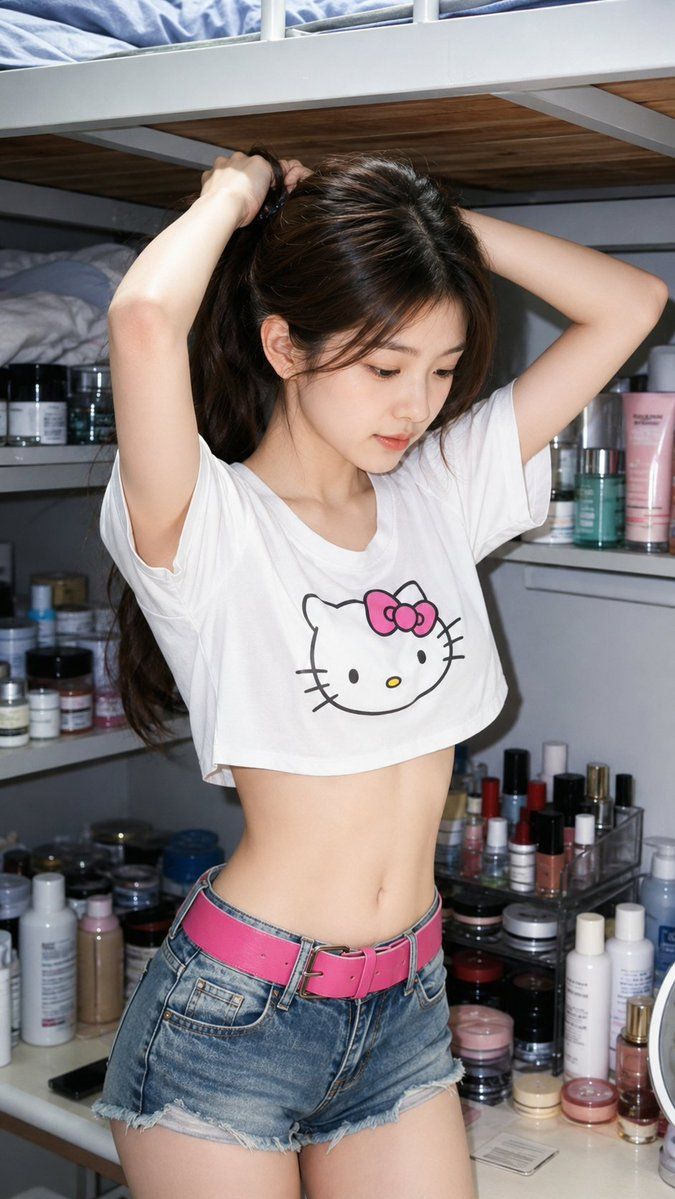
随性护肤梳妆台人像
Enlarge

随性护肤梳妆台人像

Prompt
Use my uploaded portrait only for facial identity and hairstyle. Recreate the uploaded person in a realistic casual indoor snapshot, matching this reference style: standing in a {argument name="setting" default="small bedroom / vanity corner"} with shelves full of skincare bottles, makeup jars, and cosmetics in the background. The person is captured from a slightly high front angle, upper body to thighs, arms raised while tying their hair, head turned slightly downward in a soft side-profile pose. Wear a {argument name="top" default="loose white cropped T-shirt with a cute simple cartoon-style cat graphic"}, {argument name="bottom" default="light blue denim shorts"}, and a bright pink belt. Slim casual summer outfit, natural waist and body proportions, realistic fabric folds. Bright direct-camera flash look, cool white indoor lighting, slightly overexposed skin highlights, phone-camera realism, shallow depth of field, candid personal-photo atmosphere. Keep the face highly recognizable from my uploaded portrait, with realistic skin texture, natural facial structure, real hair details, and no AI-plastic smoothing. Do not make it anime, doll-like, or overly polished. No watermark, no logo, no text.
Category
Charts & Infographics
Model
GPT Image 2
Creator
Shinning
Views3
Source ID
22862
Published
May 27, 2026

Guide

About "随性护肤梳妆台人像"

What is this prompt for?

"随性护肤梳妆台人像" AI image prompt for GPT Image 2 (Charts & Infographics). 创作一张写实风格的抓拍照片,展示人物在护肤梳妆台前扎头发,并采用直闪光灯照明。 Copy it on Picva and recreate the look in one clic…

The full copyable prompt and example visuals above are ready for AI image generation or one-click recreate in Picva.

How to use this prompt

  1. Step 1

    Open the prompt detail

    Review the example visuals, category, and full prompt text for "随性护肤梳妆台人像".

  2. Step 2

    Copy the prompt

    Copy the prompt body from this page, or load it directly in Studio.

  3. Step 3

    Pick a model (GPT Image 2)

    Prefer GPT Image 2. If you switch models, keep subject and composition and tweak style terms.

  4. Step 4

    Generate and export

    Recreate the look in Picva, or export into your workflow for editing and publishing.

FAQ

What is the "随性护肤梳妆台人像" prompt?
It is an AI image-generation prompt for GPT Image 2 in the Charts & Infographics category. This page includes the full prompt text, example visuals, and a one-click recreate path in Picva.
How do I use this prompt to generate an image?
Copy the prompt from this page, or use Generate / Studio. Paste it into a compatible image model, or recreate the look in Picva with optional reference images.
Which model is this prompt for?
This page lists GPT Image 2. Most descriptive prompts also transfer to nearby image models such as GPT Image, Flux, or Midjourney with light style tweaks.
Can I use the result commercially?
You can usually copy the prompt for creation, but commercial use of the final image depends on the model terms, reference-image rights, and the generated content. Follow the source author and platform rules.





