20

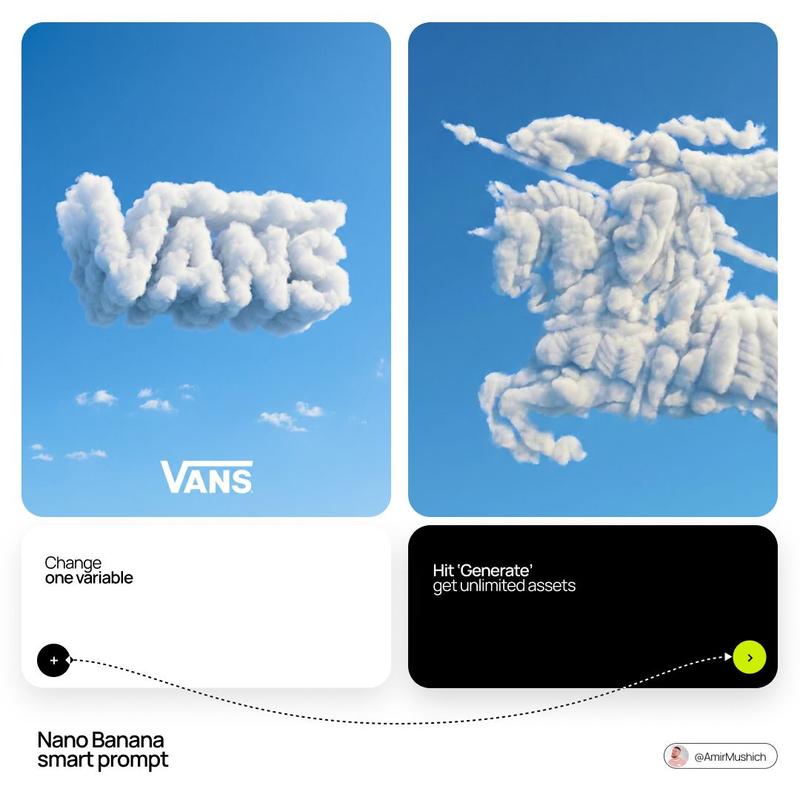
云雾品牌 Logo 场景
Enlarge

Example images

云雾品牌 Logo 场景

Prompt
A highly detailed cinematic 3D scene featuring a {argument name="brand logo" default="famous brand logo"} formed entirely from thick volumetric clouds. The clouds are dense, realistic, and richly textured, glowing with dramatic rim lighting and soft atmospheric diffusion. The logo emerges clearly in the center of a vast storm-filled sky, surrounded by swirling mist, depth-heavy cloud layers, and cinematic lighting effects.
The environment is surreal and epic, with strong contrast between light and shadow, ultra-realistic volumetric rendering, and atmospheric depth. The logo shape is perfectly defined but made entirely of natural cloud formations, giving it a powerful and divine presence.
Lighting is dramatic, with glowing edges, subtle bloom, and cinematic color grading. The mood is grand, futuristic, and visually striking, like a high-budget fantasy film shot.
Ultra-detailed, 8K quality, depth of field, soft fog diffusion, HDR lighting, highly realistic cloud physics, cinematic composition, centered framing.
Category
Brand & Logos
Model
GPT Image 2
Creator
Nexora
Views0
Source ID
27163
Published
Jun 29, 2026

Guide

About "云雾品牌 Logo 场景"

What is this prompt for?

"云雾品牌 Logo 场景" AI image prompt for GPT Image 2 (Brand & Logos). 一个电影级 3D 提示词,用于生成由逼真的体积云在戏剧性天空中构成的品牌 Logo。 Copy it on Picva and recreate the look in one click.

The full copyable prompt and example visuals above are ready for AI image generation or one-click recreate in Picva.

How to use this prompt

  1. Step 1

    Open the prompt detail

    Review the example visuals, category, and full prompt text for "云雾品牌 Logo 场景".

  2. Step 2

    Copy the prompt

    Copy the prompt body from this page, or load it directly in Studio.

  3. Step 3

    Pick a model (GPT Image 2)

    Prefer GPT Image 2. If you switch models, keep subject and composition and tweak style terms.

  4. Step 4

    Generate and export

    Recreate the look in Picva, or export into your workflow for editing and publishing.

FAQ

What is the "云雾品牌 Logo 场景" prompt?
It is an AI image-generation prompt for GPT Image 2 in the Brand & Logos category. This page includes the full prompt text, example visuals, and a one-click recreate path in Picva.
How do I use this prompt to generate an image?
Copy the prompt from this page, or use Generate / Studio. Paste it into a compatible image model, or recreate the look in Picva with optional reference images.
Which model is this prompt for?
This page lists GPT Image 2. Most descriptive prompts also transfer to nearby image models such as GPT Image, Flux, or Midjourney with light style tweaks.
Can I use the result commercially?
You can usually copy the prompt for creation, but commercial use of the final image depends on the model terms, reference-image rights, and the generated content. Follow the source author and platform rules.