18

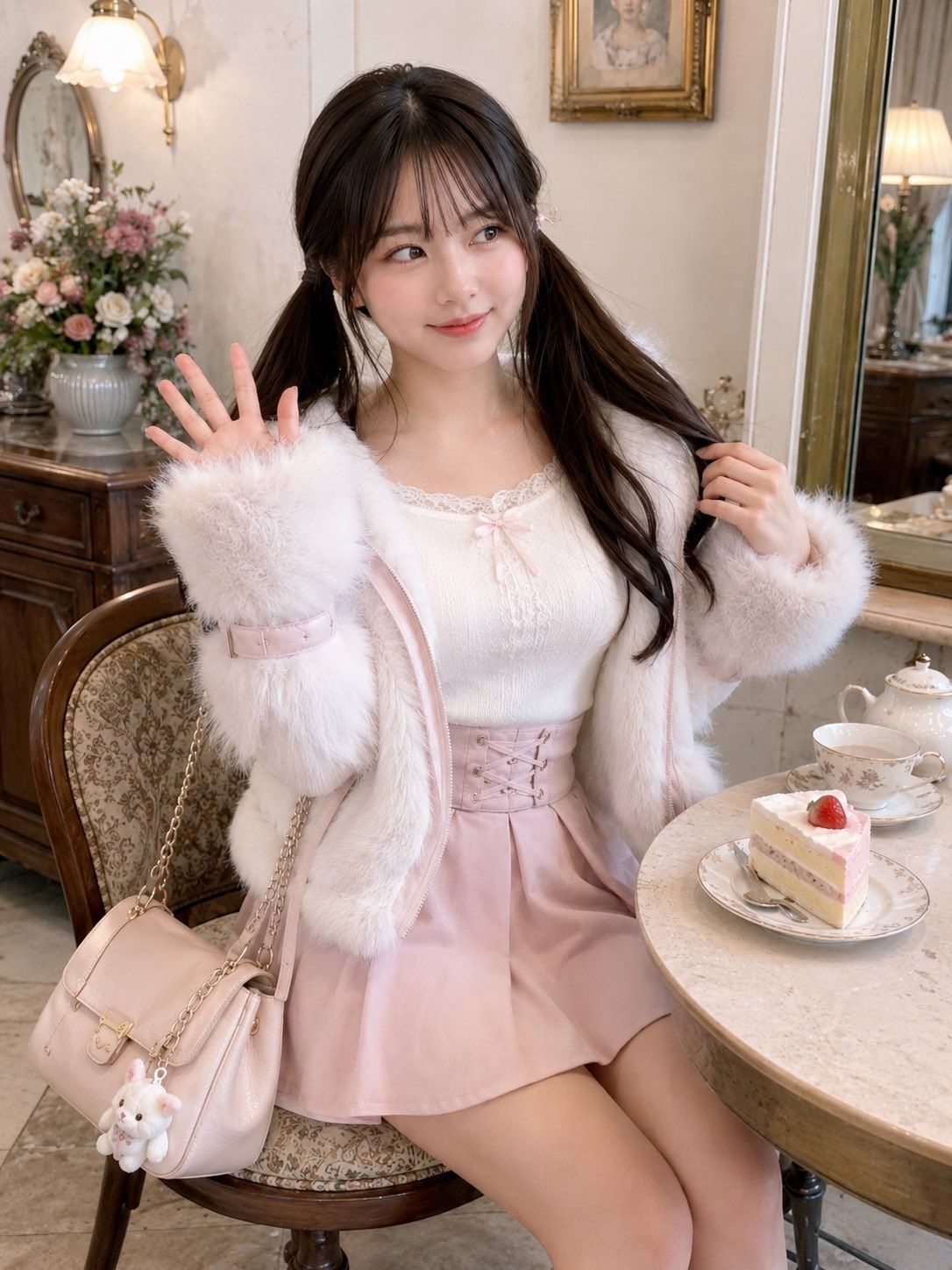
Coquette 风格茶室肖像
Enlarge

Example images

Coquette 风格茶室肖像

Prompt
Create a realistic, high-resolution fashion portrait of a cute young woman in a romantic vintage tea room, seated at a small round marble café table. She has {argument name="hair color" default="dark brown"} long hair styled in twin low pigtails with wispy bangs, soft natural makeup, and a gentle playful smile while looking slightly to the side. Pose her sitting on an ornate wooden chair with patterned upholstery, raising one hand in a small wave and holding one pigtail with the other. Dress her in a soft feminine coquette outfit: a fluffy white faux-fur jacket with oversized fuzzy cuffs, a white lace-trim camisole with a tiny pink bow, and a pale pink high-waisted mini skirt with a corset-lace front. Add a pale pink shoulder bag with a gold chain strap hanging from the chair, decorated with one small white plush bunny charm. On the table place exactly 3 visible tea-time items: a delicate floral teacup and saucer, a white porcelain teapot, and a slice of strawberry shortcake on a floral plate with a fork. The background should show an elegant shabby-chic room with warm cream walls, antique wooden furniture, a gold-framed mirror, a framed portrait, a wall sconce lamp, and a large vase of pastel flowers. Use soft warm indoor lighting, creamy pastel tones, shallow depth of field, detailed textures, natural skin, photorealistic quality, vertical 3:4 composition, cozy dreamy Japanese girly aesthetic, no text, no watermark.
Category
Architecture & Spaces
Model
GPT Image 2
Views1
Source ID
27273
Published
Jun 30, 2026

Guide

About "Coquette 风格茶室肖像"

What is this prompt for?

"Coquette 风格茶室肖像" AI image prompt for GPT Image 2 (Architecture & Spaces). 一张写实风格的竖版肖像,描绘了一位甜美 Coquette 风格的年轻女性在复古柔和色调茶室中的姿态,非常适合时尚或生活方式类影像。 Copy it on Picva a…

The full copyable prompt and example visuals above are ready for AI image generation or one-click recreate in Picva.

How to use this prompt

  1. Step 1

    Open the prompt detail

    Review the example visuals, category, and full prompt text for "Coquette 风格茶室肖像".

  2. Step 2

    Copy the prompt

    Copy the prompt body from this page, or load it directly in Studio.

  3. Step 3

    Pick a model (GPT Image 2)

    Prefer GPT Image 2. If you switch models, keep subject and composition and tweak style terms.

  4. Step 4

    Generate and export

    Recreate the look in Picva, or export into your workflow for editing and publishing.

FAQ

What is the "Coquette 风格茶室肖像" prompt?
It is an AI image-generation prompt for GPT Image 2 in the Architecture & Spaces category. This page includes the full prompt text, example visuals, and a one-click recreate path in Picva.
How do I use this prompt to generate an image?
Copy the prompt from this page, or use Generate / Studio. Paste it into a compatible image model, or recreate the look in Picva with optional reference images.
Which model is this prompt for?
This page lists GPT Image 2. Most descriptive prompts also transfer to nearby image models such as GPT Image, Flux, or Midjourney with light style tweaks.
Can I use the result commercially?
You can usually copy the prompt for creation, but commercial use of the final image depends on the model terms, reference-image rights, and the generated content. Follow the source author and platform rules.