20

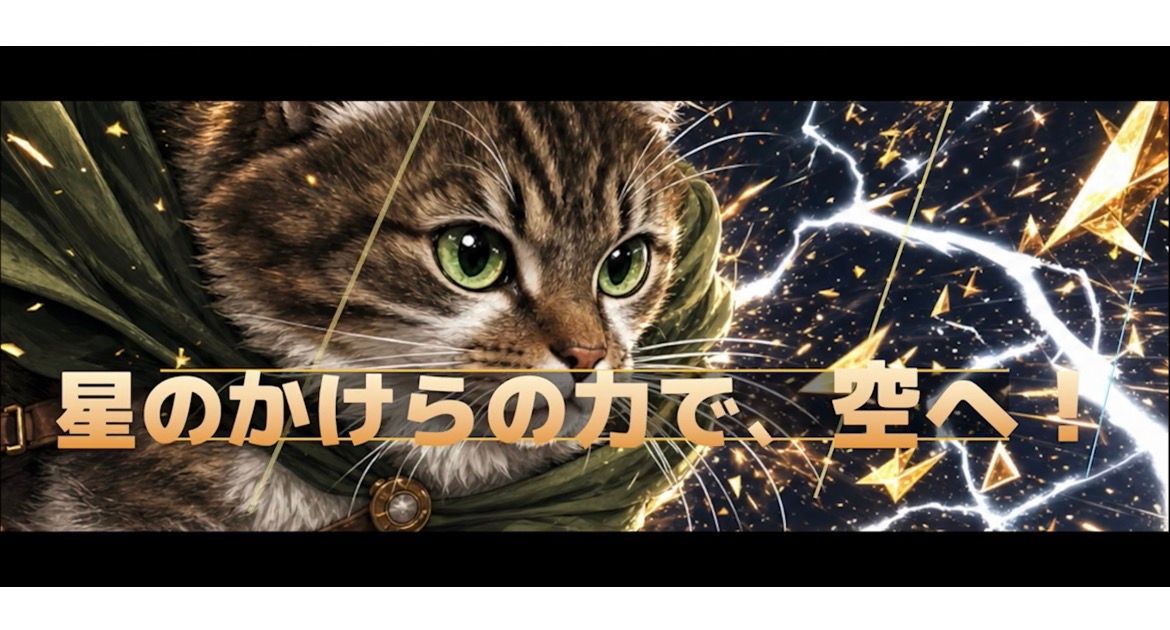
英雄猫 RPG 特写横幅
Enlarge

Example images

英雄猫 RPG 特写横幅

Prompt
Create an ultra-wide cinematic mobile game cut-in banner in a dramatic fantasy anime-realism style. Canvas is a very wide horizontal rectangle, about 21:9, framed with thick black letterbox bars above and below the action area for a movie-like special attack screen. The subject is a heroic brown tabby cat, close-up from the shoulders up, positioned mostly on the left half and facing right with intense large green eyes, detailed fur, long white whiskers, and a determined expression. The cat wears a dark olive-green adventurer cloak with folds flowing backward and one visible round bronze clasp near the lower left. The background is a dark starry cosmic battle scene filled with glowing gold shards, sparks, triangular crystal fragments, streaking light trails, and bright white lightning bolts radiating across the right half. Place one large bold Japanese attack phrase across the lower-middle foreground, centered and spanning almost the full width: {argument name="attack phrase" default="星のかけらの力で 空へ!"}. The typography should be thick, heavy, game-like, pale cream to warm gold gradient with subtle beveling, dark shadow, and a thin horizontal golden line passing behind or through the text, making it feel like a special move title card. Keep the cat partially behind the text so the words dominate the cut-in. Use high contrast, sharp details, dynamic diagonal energy, glittering particles, and a premium fantasy RPG visual style. No extra logos, UI buttons, watermarks, or additional text.
Category
UI & Interfaces
Model
GPT Image 2
Views3
Source ID
27285
Published
Jun 30, 2026

Guide

About "英雄猫 RPG 特写横幅"

What is this prompt for?

"英雄猫 RPG 特写横幅" AI image prompt for GPT Image 2 (UI & Interfaces). 生成一张电影级超宽奇幻游戏特殊攻击特写,画面包含一只英雄虎斑猫、闪电、星辰碎片以及醒目的日文标题文字。 Copy it on Picva and recreate the look in…

The full copyable prompt and example visuals above are ready for AI image generation or one-click recreate in Picva.

How to use this prompt

  1. Step 1

    Open the prompt detail

    Review the example visuals, category, and full prompt text for "英雄猫 RPG 特写横幅".

  2. Step 2

    Copy the prompt

    Copy the prompt body from this page, or load it directly in Studio.

  3. Step 3

    Pick a model (GPT Image 2)

    Prefer GPT Image 2. If you switch models, keep subject and composition and tweak style terms.

  4. Step 4

    Generate and export

    Recreate the look in Picva, or export into your workflow for editing and publishing.

FAQ

What is the "英雄猫 RPG 特写横幅" prompt?
It is an AI image-generation prompt for GPT Image 2 in the UI & Interfaces category. This page includes the full prompt text, example visuals, and a one-click recreate path in Picva.
How do I use this prompt to generate an image?
Copy the prompt from this page, or use Generate / Studio. Paste it into a compatible image model, or recreate the look in Picva with optional reference images.
Which model is this prompt for?
This page lists GPT Image 2. Most descriptive prompts also transfer to nearby image models such as GPT Image, Flux, or Midjourney with light style tweaks.
Can I use the result commercially?
You can usually copy the prompt for creation, but commercial use of the final image depends on the model terms, reference-image rights, and the generated content. Follow the source author and platform rules.