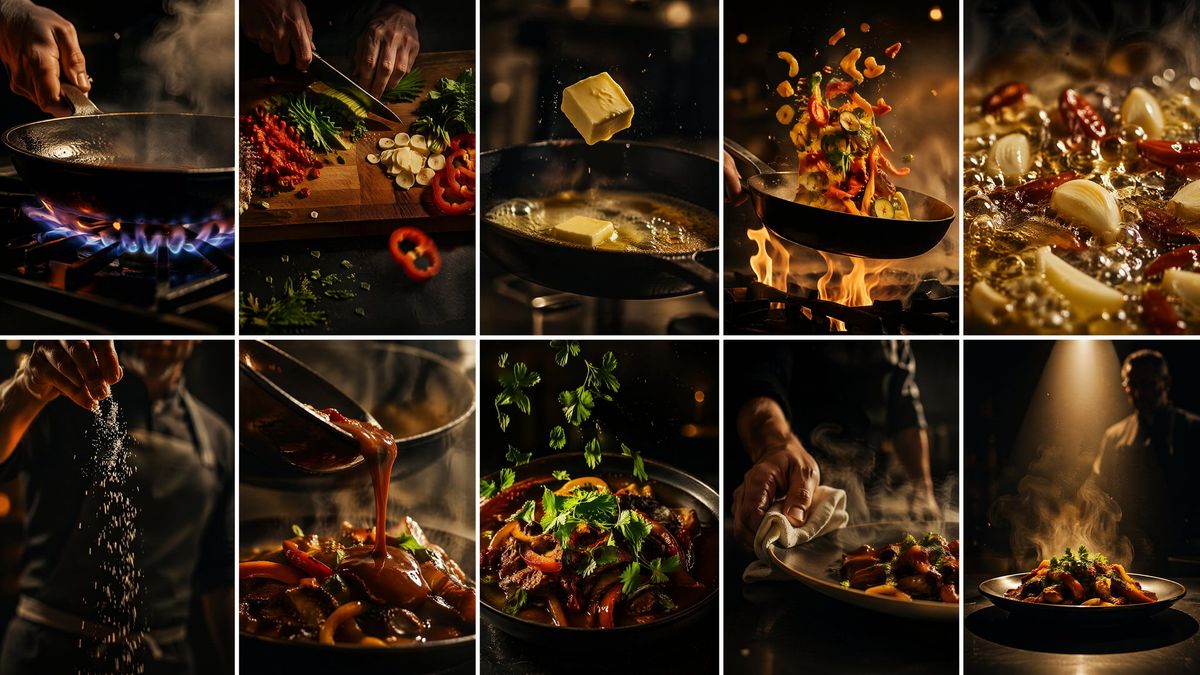
电影感火焰厨师分镜脚本
Prompt
Goal: Create a cinematic storyboard contact sheet for {argument name="film title" default="THE FLAME CHEF"}, a high-energy 15-second cooking film showing a dramatic progression from raw heat and ingredients to a finished plated dish.

Canvas: Wide 16:9 image formatted as a 10-panel grid, exactly 2 rows by 5 columns, with thin clean white gutters separating every panel. Each panel is a vertical cinematic frame with shallow depth of field, rich warm amber highlights, deep black shadows, steam, sparks, and natural film grain.

Visual style: Hyper-realistic food cinematography shot as if on ARRI Alexa 35 with a 35mm lens, fast rhythmic pacing implied through motion blur, whip-pan energy, speed-ramp frozen moments, dramatic kitchen lighting, glossy sauces, firelight, smoke, bokeh, and high contrast. No text overlays, no logos, no watermark.

Panel count and sequence: Use exactly 10 discrete scenes.
1. Top-left: Close-up of a chef’s hand gripping a pan handle over a blue gas flame; the empty black wok or skillet steams in warm darkness.
2. Top row second: Overhead close-up of hands chopping fresh ingredients on a wooden board: red peppers, sliced garlic, green herbs, and small diced red aromatics scattered dramatically.
3. Top row third: A cube of butter suspended midair above a hot pan, with another cube melting and bubbling below, droplets and golden reflections visible.
4. Top row fourth: A wok toss over open flames, vegetables and ingredients flying upward in an arc, orange fire licking beneath the pan.
5. Top-right: Extreme macro of garlic cloves and dried red chilies sizzling in vigorously bubbling oil, with steam and golden oil highlights.
6. Bottom-left: Chef’s torso and hand sprinkling a cascade of coarse salt or seasoning downward through a dark smoky beam of light.
7. Bottom row second: Close-up of glossy {argument name="sauce type" default="dark red-brown chili glaze"} being poured from a spoon onto a mound of cooked vegetables or meat in a bowl.
8. Bottom row third: Finished stir-fry in a dark bowl, topped with abundant fresh cilantro leaves; red peppers, seared pieces, glossy sauce, and steam are visible.
9. Bottom row fourth: Chef’s hand wiping the rim of the plated dish with a white cloth, refining presentation in a smoky low-lit kitchen.
10. Bottom-right: Hero final plate under a single overhead spotlight, steaming dramatically on a dark table, chef silhouette blurred in the background.

Subject details: The chef is mostly anonymous, visible only through hands, torso, or silhouette; focus on kinetic cooking artistry, flames, steam, fresh herbs, garlic, chilies, peppers, butter, oil, sauce, and final plating. Make the finished dish look like {argument name="dish" default="spicy flame-seared stir-fry"} with rich warm colors and restaurant-level plating.

Constraints: Maintain the exact 2x5 layout and exactly 10 panels. Keep the palette warm, cinematic, and moody. Preserve realistic food textures and motion. Do not add captions, subtitles, interface elements, or extra panels.- Category
- UI & Interfaces
- Model
- GPT Image 2
- Creator
- Shara
- Source ID
- 27509
- Published
- Jul 2, 2026
Views3