20

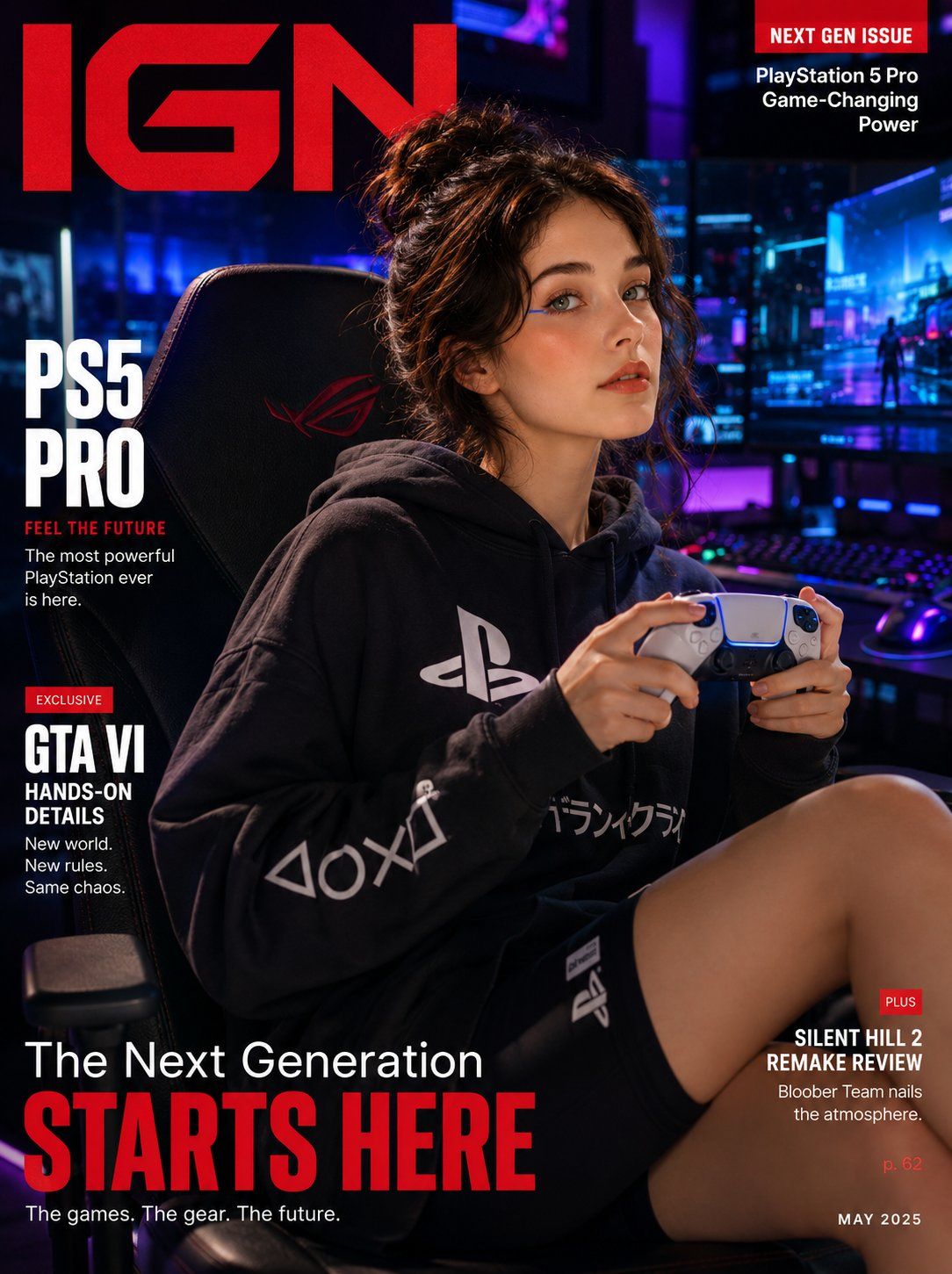
游戏生活方式杂志封面
Enlarge

游戏生活方式杂志封面

Prompt
Ultra-realistic gaming lifestyle magazine cover featuring a {argument name="subject" default="cool Korean woman"} in an {argument name="outfit" default="oversized branded gaming hoodie and biker shorts"}, lounging confidently on a sleek gaming chair, holding a PlayStation 5 Pro DualSense controller with both hands mid-game, intense focused expression with a subtle smirk. Soft glowing skin, minimal gaming-girl makeup, neon eyeliner accent, hair in a messy bun. Background: moody dark gaming setup — multi-monitor RGB battlestation glowing in cyan and purple neon behind her, bokeh RGB light scatter. "{argument name="magazine title" default="IGN"}" masthead in bold red gaming serif with "NEXT GEN ISSUE" callout. 35mm lens, ultra-detailed controller texture and RGB neon skin glow, 8K cinematic gaming editorial.

Negative: cartoon, anime, blurry, watermark, fake controller design.
Category
Posters & Typography
Model
GPT Image 2
Views7
Source ID
27558
Published
Jul 3, 2026

Guide

About "游戏生活方式杂志封面"

What is this prompt for?

"游戏生活方式杂志封面" AI image prompt for GPT Image 2 (Posters & Typography). 生成一张超写实的杂志封面,展示处于霓虹灯环境下的玩家,非常适合游戏类编辑内容。 Copy it on Picva and recreate the look in one clic…

The full copyable prompt and example visuals above are ready for AI image generation or one-click recreate in Picva.

How to use this prompt

  1. Step 1

    Open the prompt detail

    Review the example visuals, category, and full prompt text for "游戏生活方式杂志封面".

  2. Step 2

    Copy the prompt

    Copy the prompt body from this page, or load it directly in Studio.

  3. Step 3

    Pick a model (GPT Image 2)

    Prefer GPT Image 2. If you switch models, keep subject and composition and tweak style terms.

  4. Step 4

    Generate and export

    Recreate the look in Picva, or export into your workflow for editing and publishing.

FAQ

What is the "游戏生活方式杂志封面" prompt?
It is an AI image-generation prompt for GPT Image 2 in the Posters & Typography category. This page includes the full prompt text, example visuals, and a one-click recreate path in Picva.
How do I use this prompt to generate an image?
Copy the prompt from this page, or use Generate / Studio. Paste it into a compatible image model, or recreate the look in Picva with optional reference images.
Which model is this prompt for?
This page lists GPT Image 2. Most descriptive prompts also transfer to nearby image models such as GPT Image, Flux, or Midjourney with light style tweaks.
Can I use the result commercially?
You can usually copy the prompt for creation, but commercial use of the final image depends on the model terms, reference-image rights, and the generated content. Follow the source author and platform rules.




