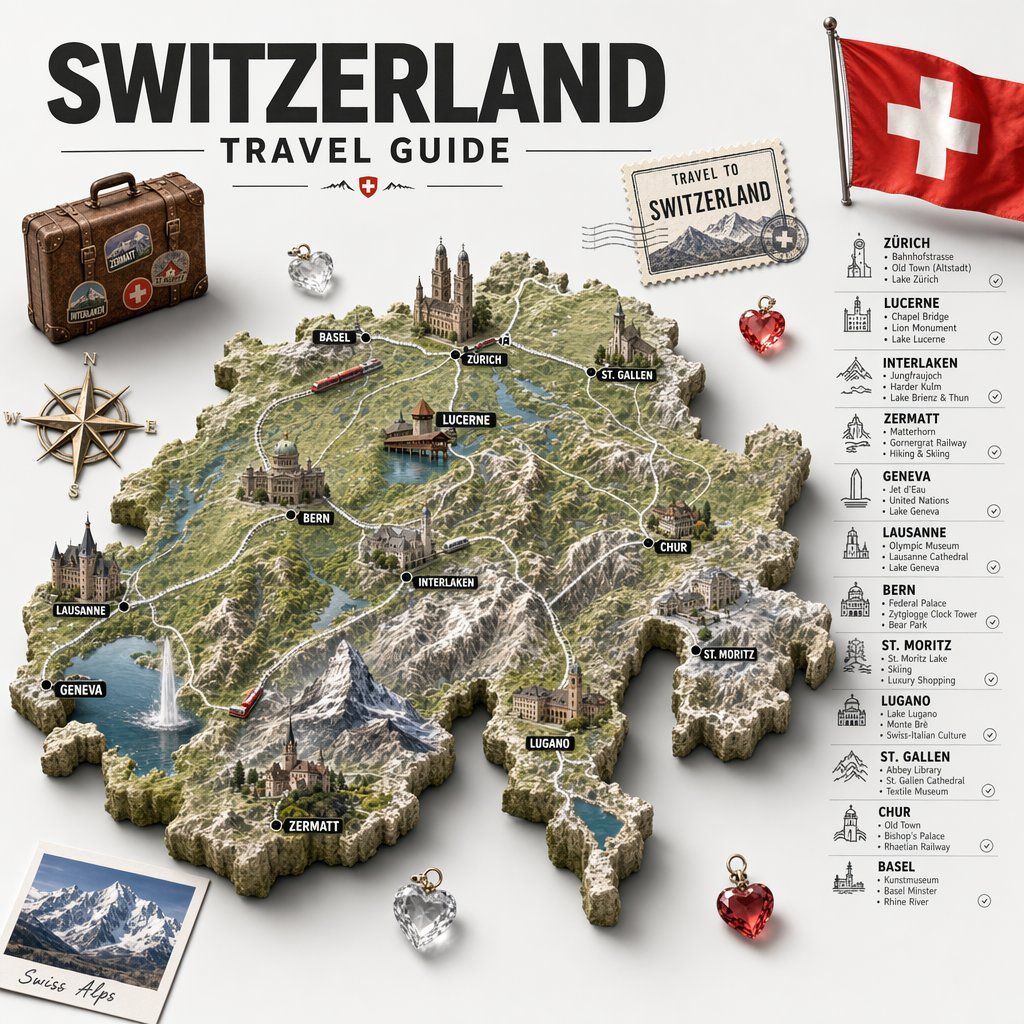
瑞士旅游指南 3D 地形图海报
Prompt
Create a highly detailed vintage-inspired illustrated travel poster and infographic for {argument name="country name" default="Switzerland"}, shown as a sculpted 3D relief map centered on a clean light gray background. At the top, place a huge bold black sans-serif title reading {argument name="headline text" default="SWITZERLAND"}, with smaller uppercase text below reading TRAVEL GUIDE, flanked by thin horizontal divider lines and a tiny red shield emblem with a white cross. The centerpiece is a raised topographic map of Switzerland rendered like a miniature diorama, with rocky borders, green valleys, snowy alpine peaks, blue lakes, winding white roads, and a few rail lines. Mark exactly 12 destinations on the map with black dot markers and bold black capsule labels with white uppercase text: BASEL, ZÜRICH, ST. GALLEN, LUCERNE, BERN, INTERLAKEN, CHUR, ST. MORITZ, LUGANO, ZERMATT, GENEVA, and LAUSANNE. Integrate miniature landmark buildings and scenery directly onto the map, including churches, old town towers, waterfront structures, castles, and mountain villages, plus two small red trains moving through the landscape. Add surrounding travel ephemera arranged around the map: 1 worn brown vintage suitcase with travel stickers and a red Swiss-cross badge in the upper left, 1 antique brass compass rose on the left, 1 postage stamp in the upper right reading TRAVEL TO SWITZERLAND with mountain art and postal cancellation marks, 1 realistic Swiss flag on a pole in the top right corner, 1 tilted polaroid photo in the lower left with snowy mountains and the caption {argument name="photo caption" default="Swiss Alps"}, and 4 faceted heart-shaped crystal charms total, with 2 clear/silver hearts and 2 red hearts placed around the composition. On the right side, add a vertical sightseeing list with icon illustrations and thin separators, containing exactly 12 city entries with headings and short attraction lines: ZÜRICH — Bahnhofstrasse; Old Town (Altstadt); Lake Zurich. LUCERNE — Chapel Bridge; Lion Monument; Lake Lucerne. INTERLAKEN — Jungfraujoch; Harder Kulm; Lake Brienz & Thun. ZERMATT — Matterhorn; Gornergrat Railway; Skiing & Hiking. GENEVA — Jet d'Eau; United Nations; Lake Geneva. LAUSANNE — Olympic Museum; Lausanne Cathedral; Lake Geneva. BERN — Federal Palace; Zytglogge Clock Tower; Bear Park. ST. MORITZ — St. Moritz Lake; Skiing; Luxury Shopping. LUGANO — Lake Lugano; Monte Brè; Swiss-Italian Culture. ST. GALLEN — Abbey Library; St. Gallen Cathedral; Textile Museum. CHUR — Old Town; Bishop's Palace; Rhine Valley. BASEL — Kunstmuseum; Basel Minster; Rhine River. Use a premium editorial travel-brand aesthetic, combining realistic miniature map rendering, crisp typography, soft studio shadows, subtle drop shadows under objects, and a polished tourism campaign look.- Category
- Charts & Infographics
- Model
- GPT Image 2
- Creator
- simeon-sanai
- Source ID
- 15248
- Published
- Apr 23, 2026
Views8
![A hyper-realistic 3D world guide infographic poster for [SHOW]](https://i.pixshop.app/storage/v1/render/image/public/prompt-source-media/promptsref/work-2519/image-1-c923c74e9444681d.png?width=800&quality=75&resize=contain)



![A hand-painted isometric bird’s-eye view illustration of [COUNTRY] in a vintage](https://i.pixshop.app/storage/v1/render/image/public/prompt-source-media/promptsref/work-1328/image-1-f22d173440d1df18.png?width=800&quality=75&resize=contain)