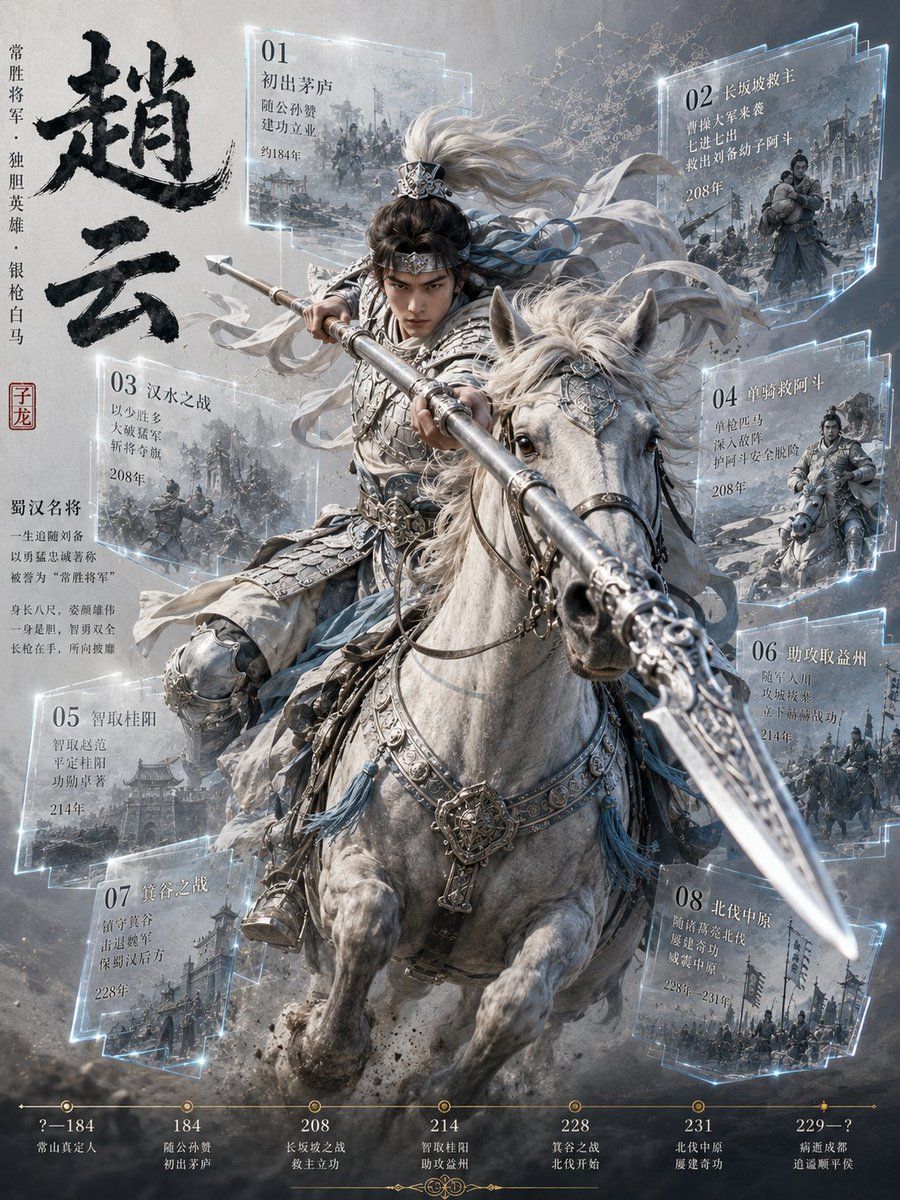
赵云骑兵信息图海报
Prompt
Goal: Create a dramatic Chinese historical-warrior infographic poster about {argument name="character name" default="Zhao Yun"}, showing a heroic armored cavalry general charging toward the viewer on a white horse, surrounded by semi-transparent holographic chronology panels.

Canvas: Vertical poster, 3:4 aspect ratio, cinematic high detail, cool gray-blue palette, smoky battlefield background, dust and debris at the bottom, bright rim lighting and icy glowing UI edges. The composition is dense but readable, with the mounted warrior centered and the horse and spear projecting forward in strong perspective.

Main subject: A Chinese Three Kingdoms-style general in ornate silver lamellar armor and layered white-gray robes rides a powerful white horse. He has long flowing silver-white hair tied with a decorative crown. The face area is deliberately obscured by a soft rectangular blur. He grips an extremely long silver spear angled from upper left toward the lower right foreground, with the spearhead close to the viewer. The horse wears elaborate silver tack, engraved bridle plates, tassels, and a chest ornament; its mane blows wildly. Mood: fearless, legendary, stormy, heroic.

Left title column: Large black ink-brush calligraphy reading {argument name="main calligraphy" default="赵云"}. Beside it, vertical text reads “常胜将军 · 独胆英雄 · 银枪白马”. Add a small red seal stamp reading “子龙”. Below, include a short biography block titled “蜀汉名将” with small Chinese body text describing him as a lifelong loyal general of the Shu Han, called the “常胜将军”, with an eight-foot stature, majestic appearance, and a silver spear in hand.

Floating chronology panels: Use exactly 8 translucent glass-like rectangular panels with cyan glowing borders, each containing a numbered title, several short Chinese lines, a year, and a small monochrome battle illustration in the background. Arrange them around the rider without covering the main horse head or spear: upper left, upper right, mid left, mid right, lower left, lower right, bottom left, bottom right. The 8 visible panels are: 01 “初出茅庐”, includes “随公孙瓒 / 建功立业 / 约184年”; 02 “长坂救救主”, includes “曹操大军来袭 / 七进七出 / 救出刘备幼子阿斗 / 208年”; 03 “汉水之战”, includes “以少胜多 / 大破曹军 / 晋夺城 / 208年”; 04 “单骑救阿斗”, includes “单枪匹马 / 深入敌阵 / 护阿斗安全脱险 / 208年”; 05 “智取桂阳”, includes “智取赵范 / 平定桂阳 / 功勋卓著 / 214年”; 06 “助攻取益州”, includes “随军入川 / 攻城拔寨 / 立下赫赫战功 / 214年”; 07 “箕谷之战”, includes “镇守箕谷 / 击退魏军 / 保蜀汉后方 / 228年”; 08 “北伐中原”, includes “随诸葛亮北伐 / 屡建奇功 / 威震中原 / 228年–231年”.

Bottom timeline: Add a thin gold horizontal timeline with exactly 7 marked date points and labels: “?–184 常山真定人”, “184 随公孙瓒 初出茅庐”, “208 长坂坡之战 救主立功”, “214 智取桂阳 助攻益州”, “228 箕谷之战 北伐开始”, “231 北伐中原 屡建奇功”, “229–? 病逝成都 追谥顺平侯”.

Visual style: Ultra-detailed fantasy-realistic Chinese historical illustration mixed with futuristic transparent infographic overlays, metallic armor detail, painterly smoke, engraved textures, cold glowing highlights, high contrast, sharp spear perspective, epic poster design. Avoid modern weapons, avoid cartoon style, avoid extra panels, avoid English text in the artwork.- Category
- Charts & Infographics
- Model
- GPT Image 2
- Creator
- Larus Canus
- Source ID
- 20330
- Published
- May 14, 2026
Views16