20

3D CG 东方奇幻美女肖像
Enlarge

3D CG 东方奇幻美女肖像

Prompt
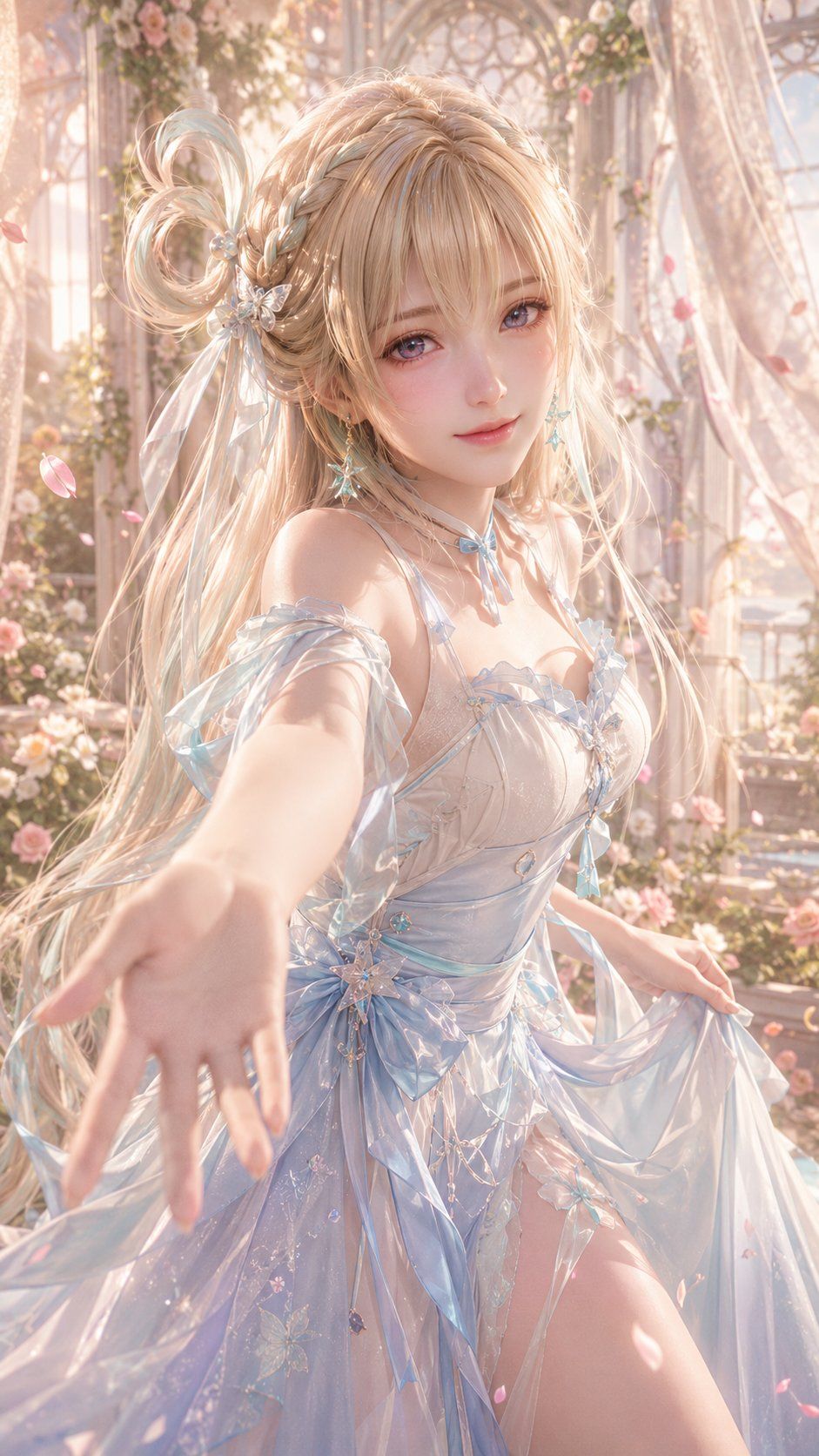
9:16 肖像,高精度 3D CG 东方奇幻女性角色肖像,3D CG 东方奇幻美女肖像,动漫风格 3D CG 角色艺术,半写实 3D 角色渲染,大腿以上的特写构图,轻微的第一人称互动视角。主体是一位年轻的东方奇幻女性,视觉年龄 20-24 岁。气质温柔、甜美、友好、梦幻,具有浪漫童话般的东方奇幻氛围。这不是平面插画,而是具有精致建模、逼真材质、电影级柔光和高端虚拟角色肖像氛围的高完成度 3D CG 角色渲染。

角色拥有精致的东方脸庞,光滑的鹅蛋脸,白皙细腻且带有轻微透明感的皮肤。眼睛大而清澈,呈现混合的浅紫蓝色和淡粉紫色,带有精致的高光和玻璃质感。表情温柔、明亮、羞涩地微笑,直视镜头。长睫毛,干净柔和的眼妆,优雅的鼻子,低饱和度桃粉色的小巧柔软嘴唇,带着温柔的微笑。整体氛围治愈且浪漫。

发型为浅金色至奶油金的长发,柔软蓬松,具有高精度的发丝建模,点缀着浅薄荷蓝绿色的挑染。轻薄的刘海,顶部和侧面有复杂的编发,配有一个小卷环马尾装饰。优雅的珍珠蝴蝶或白金星形发夹。透明的绿色星形水晶耳环。

服装为白色和浅冰蓝色的东方奇幻轻礼服,由薄缎、软纱和半透明欧根纱制成。细肩带,精致的胸部结构,浅蓝色丝带和蝴蝶结,轻盈优雅。结构清晰但克制而优美,强调纯洁和高端的奇幻感。

姿势是身体微微前倾朝向镜头,一只手自然伸出,手心向下,手指轻轻弯曲,仿佛在邀请对方牵手。另一只手放在裙子上。带有第一人称互动感的浪漫邀请氛围。

背景是日落时分梦幻的东方奇幻花园/玻璃房,特色是金色拱门、粉色玫瑰、白色花藤、薄纱窗帘和金色光斑。远处可见朦胧的东方宫廷庭院。明亮、柔和且温暖的氛围。

光影采用柔和的金色夕阳光和轻微的逆光。头发边缘、颈部和手部有高光。皮肤、头发、耳环和织物等材质具有逼真的反馈。色调:乳白色、浅金色、淡粉色、冰蓝色、薄荷绿。高端收藏级 3D CG 角色海报品质。

高细节 3D CG 渲染,虚幻引擎品质,Octane 渲染质感,电影级柔光,PBR 材质,次表面散射皮肤,逼真发丝,光泽缎面织物,半透明雪纺,水晶耳环,浪漫奇幻花园背景,牵手构图,梦幻花卉氛围,体积光,电影级景深,柔光晕,超细节,精致动漫写实,高端虚拟角色肖像
Category
Posters & Typography
Model
GPT Image 2
Creator
李岳
Views0
Source ID
25664
Published
Jun 14, 2026

Guide

About "3D CG 东方奇幻美女肖像"

What is this prompt for?

"3D CG 东方奇幻美女肖像" AI image prompt for GPT Image 2 (Posters & Typography). 一份用于生成高质量 3D CG 东方奇幻女性角色插画的详细提示词,包含浪漫光影和梦幻花园背景。 Copy it on Picva and recreate the look…

The full copyable prompt and example visuals above are ready for AI image generation or one-click recreate in Picva.

How to use this prompt

  1. Step 1

    Open the prompt detail

    Review the example visuals, category, and full prompt text for "3D CG 东方奇幻美女肖像".

  2. Step 2

    Copy the prompt

    Copy the prompt body from this page, or load it directly in Studio.

  3. Step 3

    Pick a model (GPT Image 2)

    Prefer GPT Image 2. If you switch models, keep subject and composition and tweak style terms.

  4. Step 4

    Generate and export

    Recreate the look in Picva, or export into your workflow for editing and publishing.

FAQ

What is the "3D CG 东方奇幻美女肖像" prompt?
It is an AI image-generation prompt for GPT Image 2 in the Posters & Typography category. This page includes the full prompt text, example visuals, and a one-click recreate path in Picva.
How do I use this prompt to generate an image?
Copy the prompt from this page, or use Generate / Studio. Paste it into a compatible image model, or recreate the look in Picva with optional reference images.
Which model is this prompt for?
This page lists GPT Image 2. Most descriptive prompts also transfer to nearby image models such as GPT Image, Flux, or Midjourney with light style tweaks.
Can I use the result commercially?
You can usually copy the prompt for creation, but commercial use of the final image depends on the model terms, reference-image rights, and the generated content. Follow the source author and platform rules.




