13

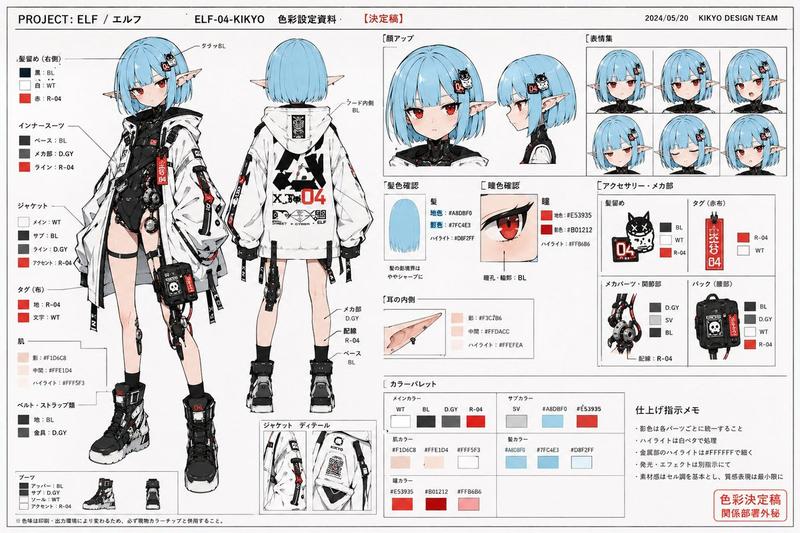
卧槽了!nano-banana 一句话生成角色设定/故事书!
Enlarge

卧槽了!nano-banana 一句话生成角色设定/故事书!

Prompt
卧槽了!nano-banana 一句话直接生成一套角色设定/故事书!这 tm 要啥自行车!
ZH25O|实用系列|Gemini2.5FlashImg Creation
1)比例设定
2)三视图
3)表情设定
4)动作设定
5)服装设定
nb 模型可以连续生成保持一致性的 文字 + 图像!!!(和 2.0 Flash 一样
【Prompt】⬇️ 
为我生成人物的角色设定(Character Design)
比例设定(不同身高对比、头身比等)
三视图(正面、侧面、背面)
表情设定(Expression Sheet) → 就是你发的那种图
动作设定(Pose Sheet) → 各种常见姿势
服装设定(Costume Design) https://t.co/OW2t79p6gV
Category
Characters & People
Model
Unknown
Creator
-Zho-
Views0
Source ID
nano-banana-one-click-role-and-storybook-creation

Guide

About "卧槽了!nano-banana 一句话生成角色设定/故事书!"

What is this prompt for?

"卧槽了!nano-banana 一句话生成角色设定/故事书!" AI image prompt for Unknown (Characters & People). 卧槽了!nano-banana 一句话直接生成一套角色设定/故事书!这 tm 要啥自行车! ZH25O|实用系列|Gemini2.5FlashImg…

The full copyable prompt and example visuals above are ready for AI image generation or one-click recreate in Picva.

How to use this prompt

  1. Step 1

    Open the prompt detail

    Review the example visuals, category, and full prompt text for "卧槽了!nano-banana 一句话生成角色设定/故事书!".

  2. Step 2

    Copy the prompt

    Copy the prompt body from this page, or load it directly in Studio.

  3. Step 3

    Pick a model (Unknown)

    Prefer Unknown. If you switch models, keep subject and composition and tweak style terms.

  4. Step 4

    Generate and export

    Recreate the look in Picva, or export into your workflow for editing and publishing.

FAQ

What is the "卧槽了!nano-banana 一句话生成角色设定/故事书!" prompt?
It is an AI image-generation prompt for Unknown in the Characters & People category. This page includes the full prompt text, example visuals, and a one-click recreate path in Picva.
How do I use this prompt to generate an image?
Copy the prompt from this page, or use Generate / Studio. Paste it into a compatible image model, or recreate the look in Picva with optional reference images.
Which model is this prompt for?
This page lists Unknown. Most descriptive prompts also transfer to nearby image models such as GPT Image, Flux, or Midjourney with light style tweaks.
Can I use the result commercially?
You can usually copy the prompt for creation, but commercial use of the final image depends on the model terms, reference-image rights, and the generated content. Follow the source author and platform rules.