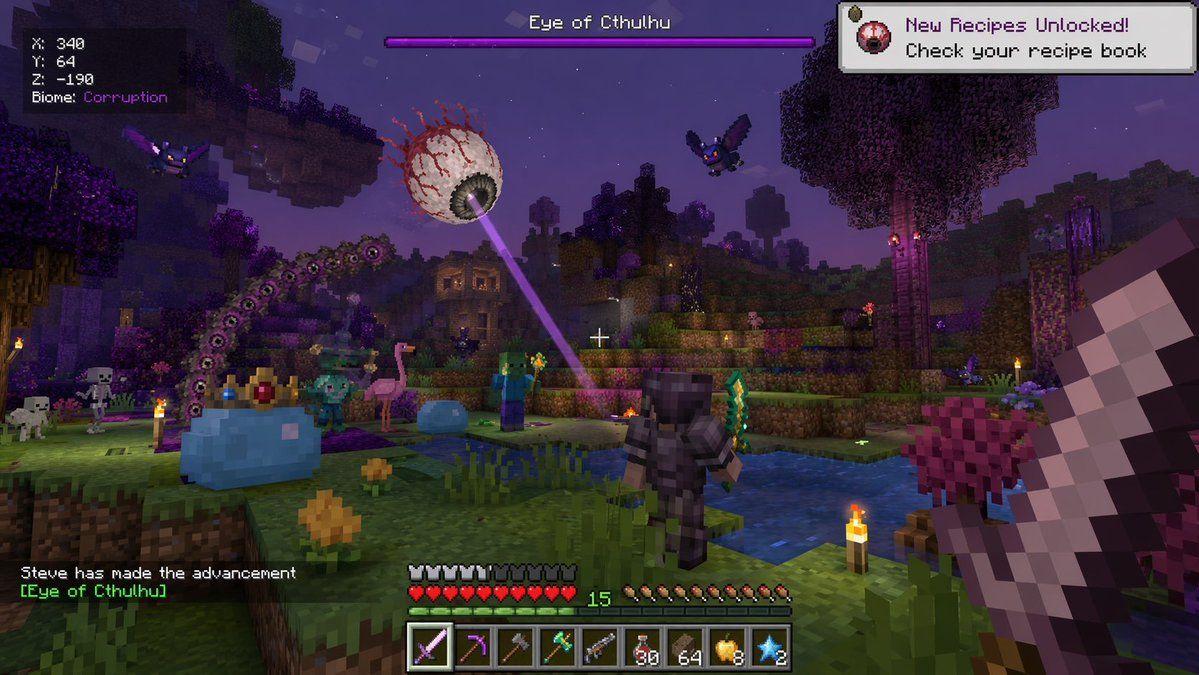
体素生存游戏 Boss 战 HUD
Prompt
{
  "type": "first-person video game screenshot",
  "setting": "blocky voxel world at night, purple corrupted biome with dark water and glowing torches",
  "entities": [
    "1 giant floating eyeball boss shooting a purple laser",
    "1 giant blue slime boss wearing a golden crown",
    "1 giant purple segmented worm monster",
    "1 player character in dark armor holding a green sword",
    "2 flying purple bat monsters",
    "2 blocky zombies",
    "2 blocky skeletons",
    "1 pink flamingo",
    "1 small blue slime"
  ],
  "perspective": "first-person, holding a large pixelated sword on the right side, white crosshair in center",
  "ui_elements": [
    {
      "position": "top-left",
      "text": "X: 340\nY: 64\nZ: -190\nBiome: {argument name=\"biome\" default=\"Corruption\"}"
    },
    {
      "position": "top-center",
      "text": "{argument name=\"boss name\" default=\"Eye of Cthulhu\"}",
      "description": "purple boss health bar"
    },
    {
      "position": "top-right",
      "text": "New Recipes Unlocked! Check your recipe book",
      "icon": "small floating eyeball"
    },
    {
      "position": "bottom-left",
      "text": "{argument name=\"player name\" default=\"Steve\"} has made the advancement [{argument name=\"boss name\" default=\"Eye of Cthulhu\"}]"
    },
    {
      "position": "bottom-center",
      "description": "HUD with 10 red hearts, 10 hunger drumsticks, green experience number 15, and a 9-slot hotbar",
      "hotbar_items": [
        "purple sword",
        "pickaxe",
        "axe",
        "green weapon",
        "gun",
        "30 red potions",
        "64 brown blocks",
        "8 golden apples",
        "2 blue stars"
      ]
    }
  ]
}- Category
- UI & Interfaces
- Model
- GPT Image 2
- Creator
- 只の人。
- Source ID
- 14061
- Published
- Apr 15, 2026
Views3


