20

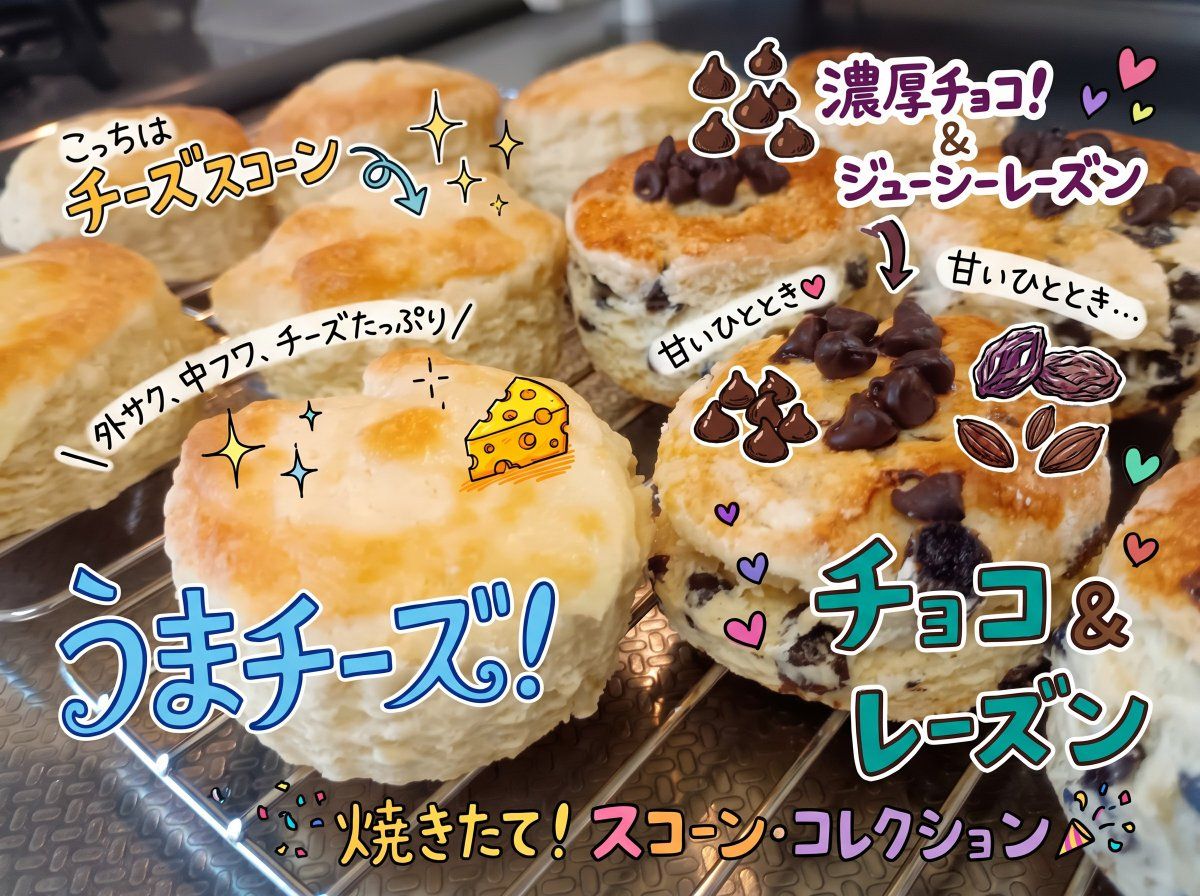
色彩丰富的司康饼标注照片
Enlarge

色彩丰富的司康饼标注照片

Prompt
Using the provided reference image, keep the same scone photo and composition, but redesign the overlaid annotations to look more polished, colorful, and social-media-worthy, as if drawn with bright marker pens and sticker-like doodles. Clearly indicate that the scones on the left are cheese scones and the scones on the right are chocolate-and-raisin scones. Replace the previous handwriting with exactly 8 visible Japanese text callouts: {argument name="left scone label" default="こっちはチーズスコーン"}, "外サク、中フワ、チーズたっぷり", {argument name="cheese headline" default="うまチーズ!"}, {argument name="bottom headline" default="焼きたて!スコーン・コレクション"}, {argument name="right scone label" default="濃厚チョコ!&ジューシーレーズン"}, "チョコ&レーズン", and two small "甘いひととき" notes near the chocolate-raisin scones. Add cute illustrated accents that were not in the original: a small cheese wedge on the cheese scone, two clusters of chocolate-chip doodles, a raisin/nut doodle, curved arrows pointing to each scone type, sparkles, hearts, confetti, and a party-popper accent. Use thick white outlines and drop shadows around the lettering so the annotations pop, while keeping the baked scones realistic and unobscured.
Category
Posters & Typography
Model
GPT Image 2
Creator
ミサキ
Views2
Source ID
19564
Published
May 10, 2026

Guide

About "色彩丰富的司康饼标注照片"

What is this prompt for?

"色彩丰富的司康饼标注照片" AI image prompt for GPT Image 2 (Posters & Typography). 将一张自制司康饼的照片转化为色彩明亮的社交媒体美食帖,配上手写风格的日语标签和趣味十足的食材涂鸦。 Copy it on Picva and recreate the look…

The full copyable prompt and example visuals above are ready for AI image generation or one-click recreate in Picva.

How to use this prompt

  1. Step 1

    Open the prompt detail

    Review the example visuals, category, and full prompt text for "色彩丰富的司康饼标注照片".

  2. Step 2

    Copy the prompt

    Copy the prompt body from this page, or load it directly in Studio.

  3. Step 3

    Pick a model (GPT Image 2)

    Prefer GPT Image 2. If you switch models, keep subject and composition and tweak style terms.

  4. Step 4

    Generate and export

    Recreate the look in Picva, or export into your workflow for editing and publishing.

FAQ

What is the "色彩丰富的司康饼标注照片" prompt?
It is an AI image-generation prompt for GPT Image 2 in the Posters & Typography category. This page includes the full prompt text, example visuals, and a one-click recreate path in Picva.
How do I use this prompt to generate an image?
Copy the prompt from this page, or use Generate / Studio. Paste it into a compatible image model, or recreate the look in Picva with optional reference images.
Which model is this prompt for?
This page lists GPT Image 2. Most descriptive prompts also transfer to nearby image models such as GPT Image, Flux, or Midjourney with light style tweaks.
Can I use the result commercially?
You can usually copy the prompt for creation, but commercial use of the final image depends on the model terms, reference-image rights, and the generated content. Follow the source author and platform rules.