20

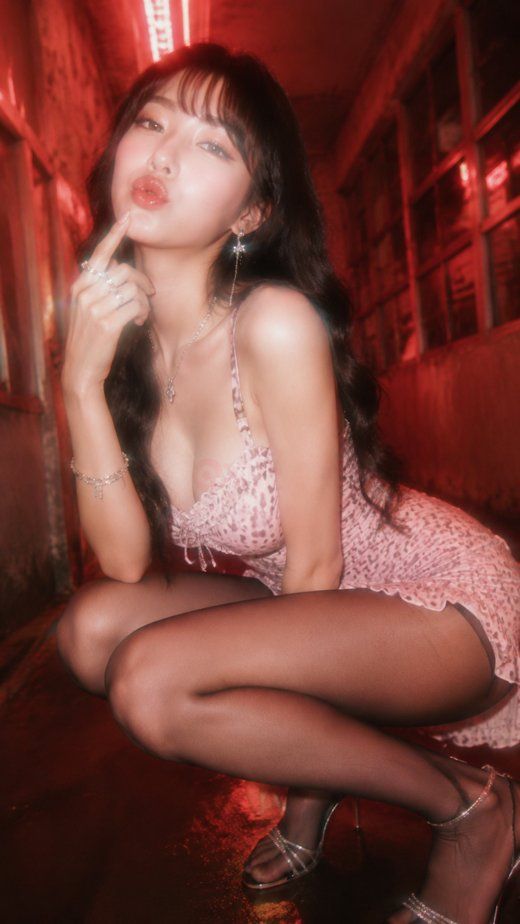
红色霓虹巷弄时尚人像
Enlarge

红色霓虹巷弄时尚人像

Prompt
Create a vertical full-body fashion editorial photo of an adult East Asian woman posing in a narrow urban alley at night, bathed in intense red neon light. She has {argument name="hair color" default="long wavy black hair with soft bangs"}, glossy makeup, dewy skin, and a playful kissy expression while crouching low and touching one finger to her lips. She wears a {argument name="dress style" default="short pink leopard-print slip mini dress with thin straps and lace trim"}, sheer dark tights, delicate silver jewelry, dangling earrings, bracelets, rings, and strappy high-heeled sandals. The setting is a cramped corridor with gritty walls, windows, reflections on wet pavement, and a bright red fluorescent tube overhead creating cinematic backlight. Use a dreamy 1990s glam-photography look with soft focus, bloom, slight motion blur, shallow depth of field, warm red haze, high contrast, and glossy skin highlights. Shoot from a low wide-angle perspective close to the subject so her crouched pose dominates the foreground, with the alley receding behind her. Keep the mood sultry but fashion-oriented, like a neon nightlife magazine cover, with no visible text, watermark, or extra people.
Category
Posters & Typography
Model
GPT Image 2
Views1
Source ID
27200
Published
Jun 29, 2026

Guide

About "红色霓虹巷弄时尚人像"

What is this prompt for?

"红色霓虹巷弄时尚人像" AI image prompt for GPT Image 2 (Posters & Typography). 一张电影感十足的低角度夜生活时尚人像,描绘了一位蹲在红色霓虹巷弄中的成年女性,适用于编辑类魅力摄影概念。 Copy it on Picva and recreate the loo…

The full copyable prompt and example visuals above are ready for AI image generation or one-click recreate in Picva.

How to use this prompt

  1. Step 1

    Open the prompt detail

    Review the example visuals, category, and full prompt text for "红色霓虹巷弄时尚人像".

  2. Step 2

    Copy the prompt

    Copy the prompt body from this page, or load it directly in Studio.

  3. Step 3

    Pick a model (GPT Image 2)

    Prefer GPT Image 2. If you switch models, keep subject and composition and tweak style terms.

  4. Step 4

    Generate and export

    Recreate the look in Picva, or export into your workflow for editing and publishing.

FAQ

What is the "红色霓虹巷弄时尚人像" prompt?
It is an AI image-generation prompt for GPT Image 2 in the Posters & Typography category. This page includes the full prompt text, example visuals, and a one-click recreate path in Picva.
How do I use this prompt to generate an image?
Copy the prompt from this page, or use Generate / Studio. Paste it into a compatible image model, or recreate the look in Picva with optional reference images.
Which model is this prompt for?
This page lists GPT Image 2. Most descriptive prompts also transfer to nearby image models such as GPT Image, Flux, or Midjourney with light style tweaks.
Can I use the result commercially?
You can usually copy the prompt for creation, but commercial use of the final image depends on the model terms, reference-image rights, and the generated content. Follow the source author and platform rules.




